The Brown PLT Blog

Articles by tag: Tools
Practical Static Analysis for Privacy Bugs
Lightweight Diagramming for Lightweight Formal Methods
Argus: Interactively Debugging Rust trait Errors
LTL Tutor
Forge: A Tool to Teach Formal Methods
Finding and Fixing Standard Misconceptions About Program Behavior
The Examplar Project: A Summary
Conceptual Mutation Testing
Identifying Problem Misconceptions
Student Help-Seeking for (Un)Specified Behaviors
Adding Function Transformers to CODAP
Students Testing Without Coercion
Combating Misconceptions by Encouraging Example-Writing
The PerMission Store
LLMs ⭢ Regular Expressions, Responsibly!
Tags: Large Language Models, Semantics, Tools
Posted on 11 December 2025.Do you use GenAI/LLMs to generate your regular expressions? We certainly do! But we always do it with trepidation, given the many slips that can occur with blindly pasting the output into a program. We may have been unclear in our prose, our prose may have been ambiguous, the domain may lend itself to ambiguity (what is a “date”?), the LLM may have misinterpreted what you said, the domain may have persistent misconceptions, and so on.
Oh, you read your regexes, you say? Is this a valid regex for dates?
^(?:(?:31-(?:0[13578]|1[02])-(?:\d{4}))|
   (?:29|30-(?:0[13-9]|1[0-2])-(?:\d{4}))|
   (?:29-02-(?:(?:\d\d(?:0[48]|[2468][048]|[13579][26]))|
              (?:[048]000)))|
   (?:0[1-9]|1\d|2[0-8]-(?:0[1-9]|1[0-2])-(?:\d{4})))
But we can do a lot better! Our new tool, PICK:Regex, does the following. It asks you for a prompt and sends it to a GenAI system. However, it doesn’t ask for one regex; instead, it uses an LLMs ability to interpret prose in multiple ways to generate multiple (about four) candidate expressions. (The details don’t matter, but if you want to you can open the images below in a new tab to read them more easily.)

In theory, that’s better than getting just one interpretation. But now you may have to read four regexes like the above, which is actually worse! Therefore, instead, PICK shows you concrete examples. Furthermore, the examples are carefully chosen to tell apart the regexes. You are then asked to upvote/downvote each example. As you do, you are actually voting on all the candidate regexes.
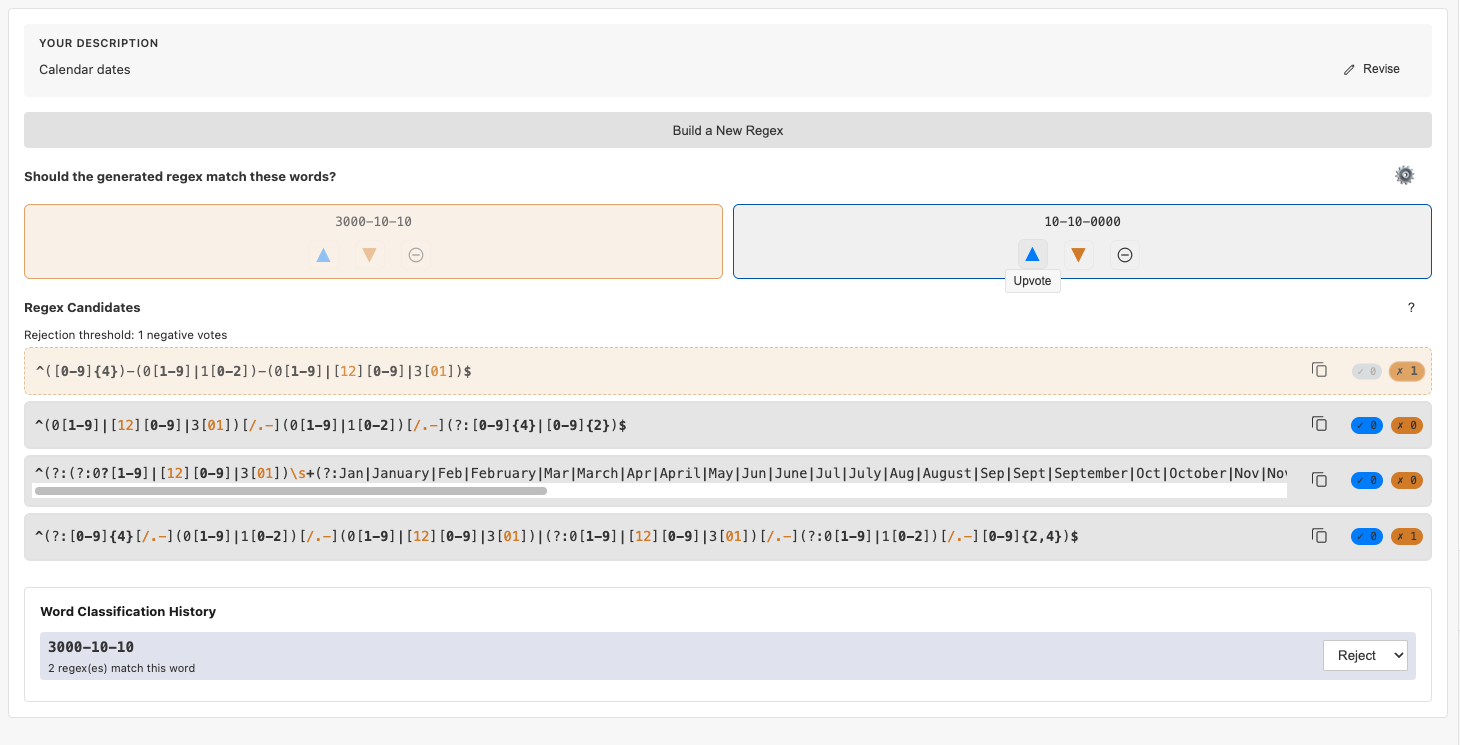
You can stop at any point (you’re always shown the regexes), but the process naturally halts when only one regex remains (this is your best candidate of the ones you’ve seen so far) or none remain (in which case it would have been dangerous to use the LLMs output!).
As you’re looking at examples, you may realize you could have provided a better prompt (or could have used a more expensive LLM). You don’t need to start over; you can revise your request. This generates regexes afresh, but critically, you don’t lose your hard work: your prior upvotes and downvotes are automatically applied to the new proposed regexes.
Also as you’re looking at examples, you might come up with some good ones of your own. You can type these into PICK and vote on them (i.e., provide both positive and negative examples), and PICK will add them to the example stream. Similarly, you can edit an example PICK has shown you before voting on it.
Finally, you can also change your mind. PICK shows you all your prior classifications at the bottom. If you change how you classified an example, that will update the scores of all the candidates.
PICK is based on the confluence of two very different bodies of ideas. It draws from cognitive science: the idea of understanding the abstract through the concrete, and the theory of contrasting cases. It also puts to work all the formal language closure properties you studied in a theory of computation class and wondered why and when they would ever be useful.
Enough prose! Please try PICK for yourself. It’s available as an extension from the Visual Studio Code Marketplace (it uses your VSCode LLM configuration). Visit this link, or search for SiddharthaPrasad.pick-regex in the Marketplace. If you don’t have a ready question, try a prompt like “countries of North America”—but before you do, what regex are you expecting? Think about it for a moment, then see what PICK offers you. Let us know what you think!
Practical Static Analysis for Privacy Bugs
Tags: Privacy, Rust, Tools, Verification
Posted on 03 August 2025.Privacy bugs are deeply problematic for software users (“once it’s out there you can’t take it back”), legally significant (due to laws like the GDPR), and difficult for programmers to find and to keep out. Static program analysis would therefore appear to be very helpful here.
Unfortunately, making an effective tool runs into several problems:
-
Rules need to be expressed in a way that is auditable by legal and policy experts, which means they cannot be too close to the level of code.
-
Policies need to then be mapped to the actual code.
-
The analysis needs to be as precise as possible.
-
The analysis needs to also be as quick as possible—ideally, fast enough to integrate into interactive development.
Our new system, Paralegal, checks off all these boxes:
- It supports policies expressed in a first-order logic, but written in a stylized English form. For instance, here is a policy stating that there is a way for all personal data to be deleted:
Somewhere: 1. For each "user data" type marked user_data: A. There is a "source" that produces "user data" where: a. There is a "deleter" marked deletes where: i) "source" goes to "deleter" - It introduces markers as a key abstraction for mapping the policy onto the program. Several of the terms above — e.g.,
user_data— are designated in a lightweight way in the source program:#[paralegal::marker(user_data)] - It deeply leverages Rust’s type system to obtain useful summaries of function behavior without having to traverse their bodies. In particular, this avoids the pain of writing mock versions of functions, which are time-consuming and error-prone, without sacrificing correctness or precision. It also has some additional optimizations, such as adaptive approximation.
As a result, Paralegal is able to efficiently and effectively analyze several third-party, real-world codebases.
For more details, see our paper!
Lightweight Diagramming for Lightweight Formal Methods
Tags: Formal Methods, Tools, Verification, Visualization
Posted on 09 June 2025.Formal methods tools like Alloy and Forge help users define, explore, verify, and diagnose specifications for complex systems incrementally. A crucial feature of these tools is their visualizer, which lets users explore generated models through graphical representations.
In some cases, they suffer from familiar usability issues—such as overlapping lines, unclear labels, or cluttered layouts—that make it hard to understand what the model represents. But even when the diagrams are clean and well-organized, they can still be confusing if the layout doesn’t reflect the structure that users expect.
For example, a visualization of a binary tree might place left and right children arbitrarily, rather than arranging them to the left and right of their parent node. This breaks with common conventions and can make it harder for users to quickly recognize familiar structures. Similarly, if a model is meant to convey a specific organization (e.g., the grouping of files in a directory) but the visualization fails to reflect this, it becomes difficult to discern the intended relationships, making the model harder to interpret and reason about.
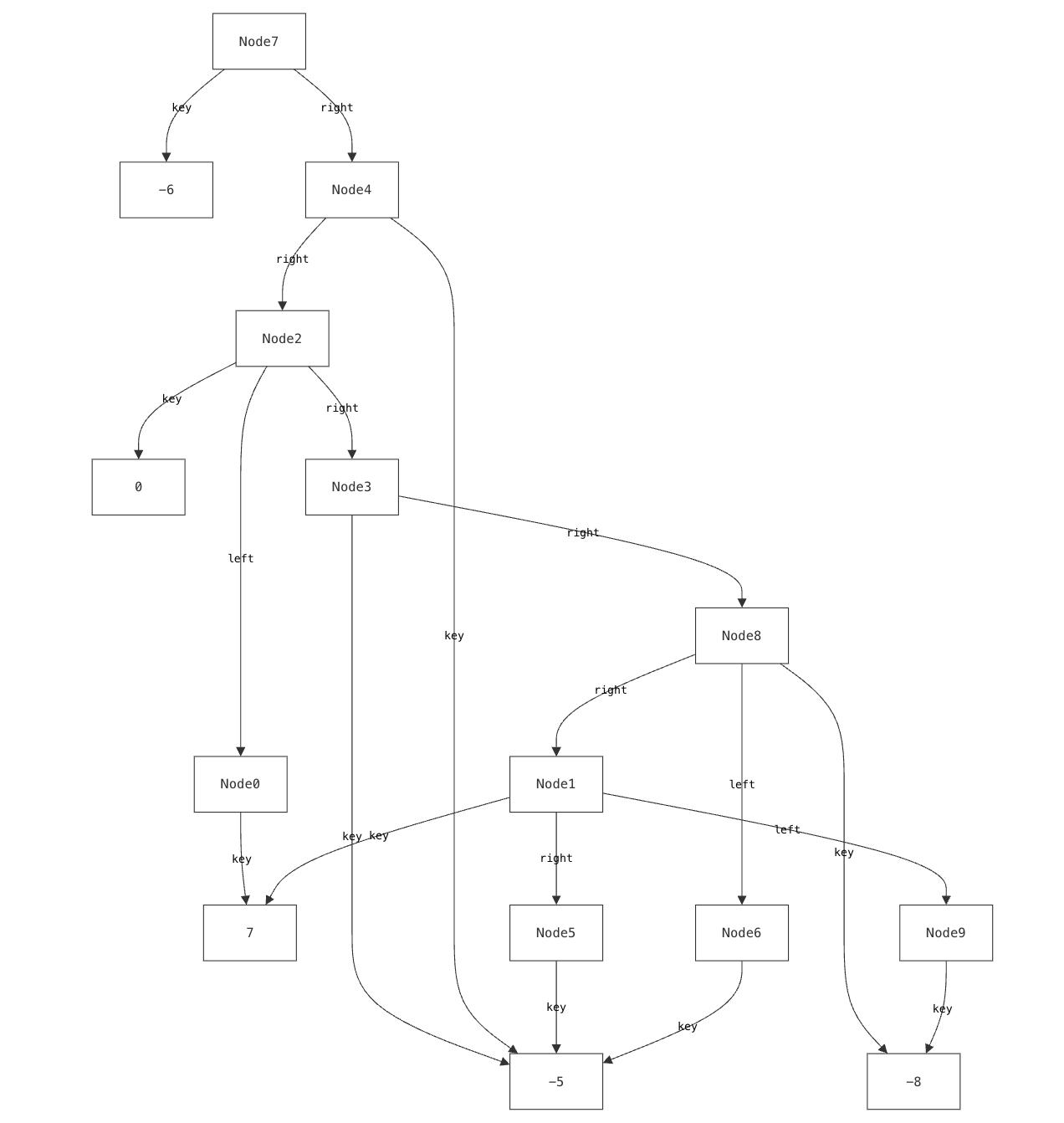
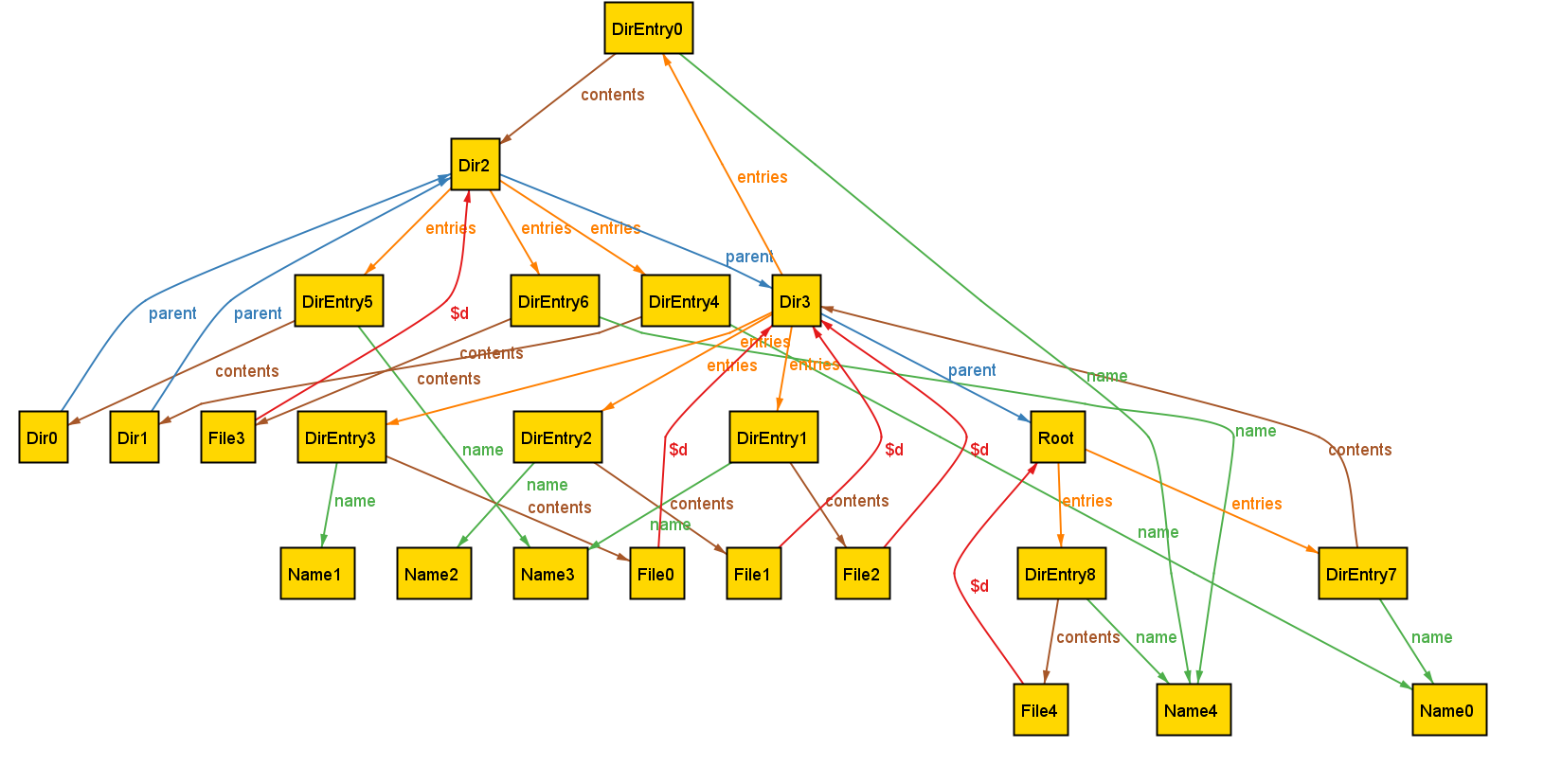
Our previous research has explored using custom, domain-specific visualizations to address this challenge. Yet existing tools for custom visualization come with several significant drawbacks:
- Users must learn and use entirely different languages to create custom visualizations, learning skills (like CSS) that have nothing to do with formal modeling.
- The level of detail required by these languages (such as controlling how elements are rendered) often makes the visualizer code larger and more complex than the models themselves.
- Most critically, these visualizations can be brittle. While careful visualization design can handle certain edge cases, they are inherently limited by their authors’ assumptions about potential issues. The very “unknown unknowns” that lightweight formal methods exist to help surface are often masked by visualizers.
We encountered this issue even when building visualizations for relatively simple data structures that we understand well. It is well-documented that experts suffer from blind spots about what mistakes students might make. When faced with such a modeling mistake, failing to specify that a node’s left and right children must be distinct, our custom visualizer failed silently.
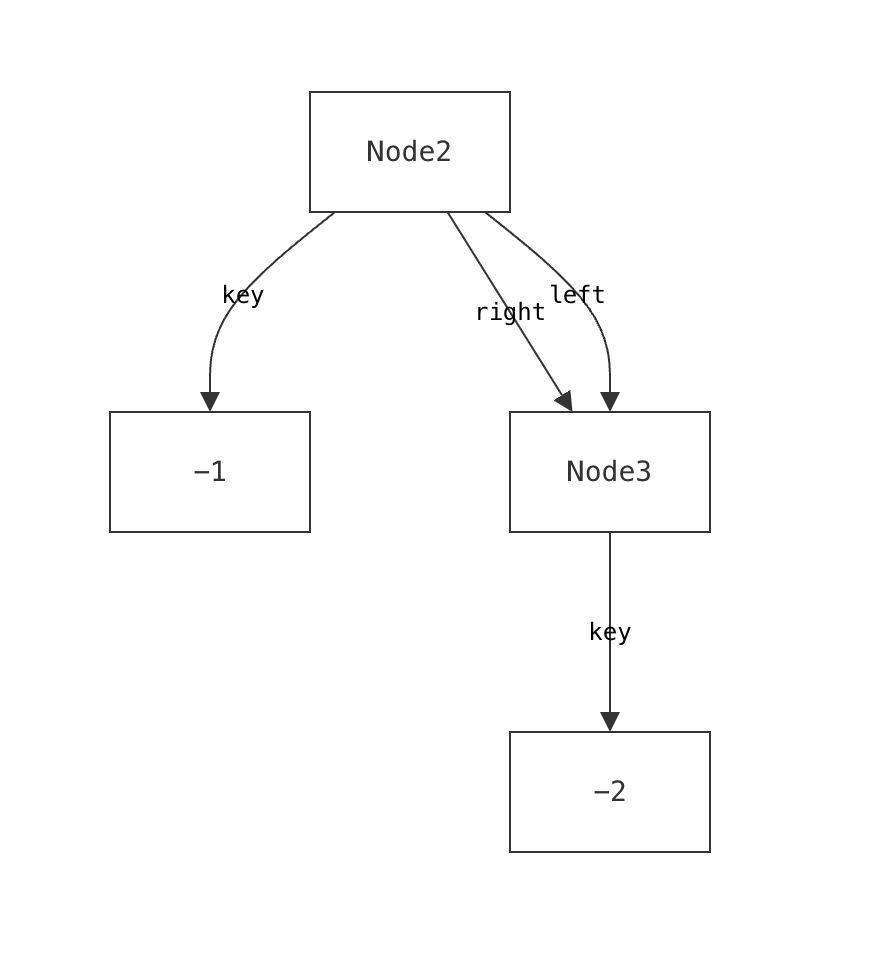
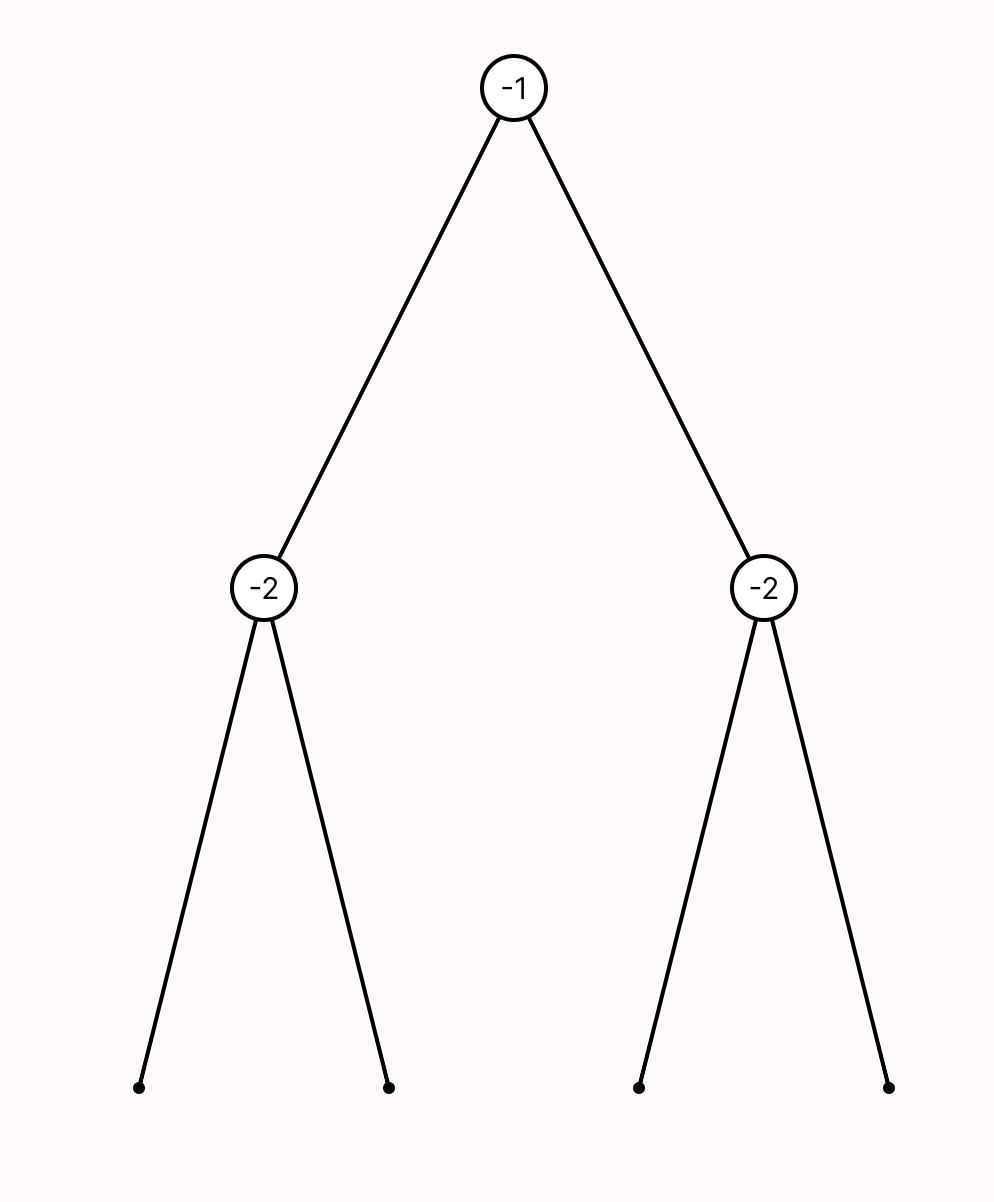
Such failures aren’t merely aesthetic—they actively prevent users from discovering a specification error.
Cope and Drag (or CnD) is a novel lightweight diagramming language built to address these issues. CnD’s design was driven by two approaches:
- A top-down exploration of cognitive science principles that influence spatial reasoning, visualization, and diagramming.
- A bottom-up analysis that distills patterns from dozens of actual custom visualizations.
The resulting language is small, requires minimal annotation, and can be used incrementally. The key idea is that each CnD operation meaningfully refines the default visualization. These operations include constraining spatial layout (such as positioning child nodes below their parents in a binary tree), grouping elements (like clustering related components in a software architecture), and directing drawing style (for instance, coloring nodes in a red-black tree based on their color).
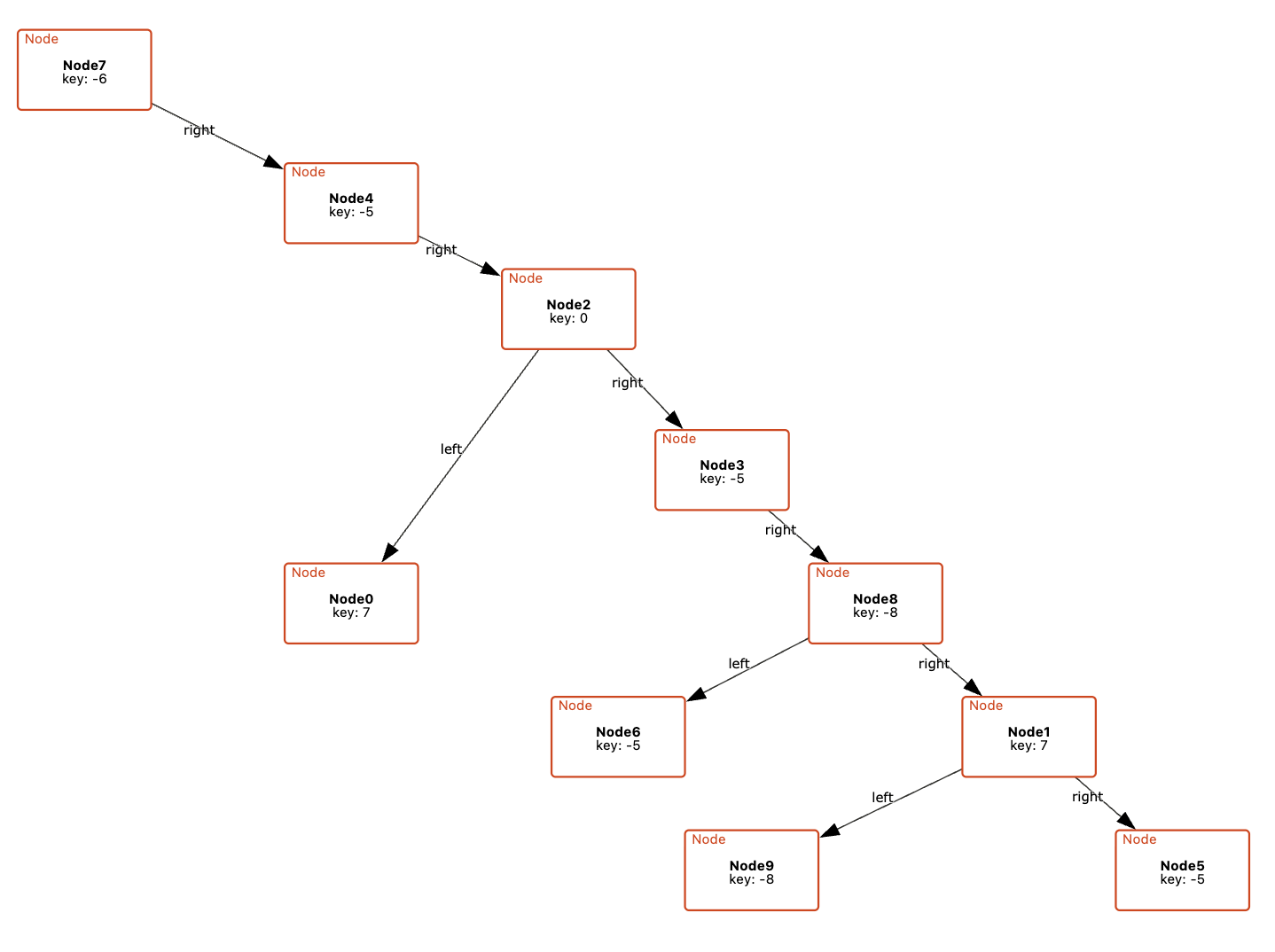
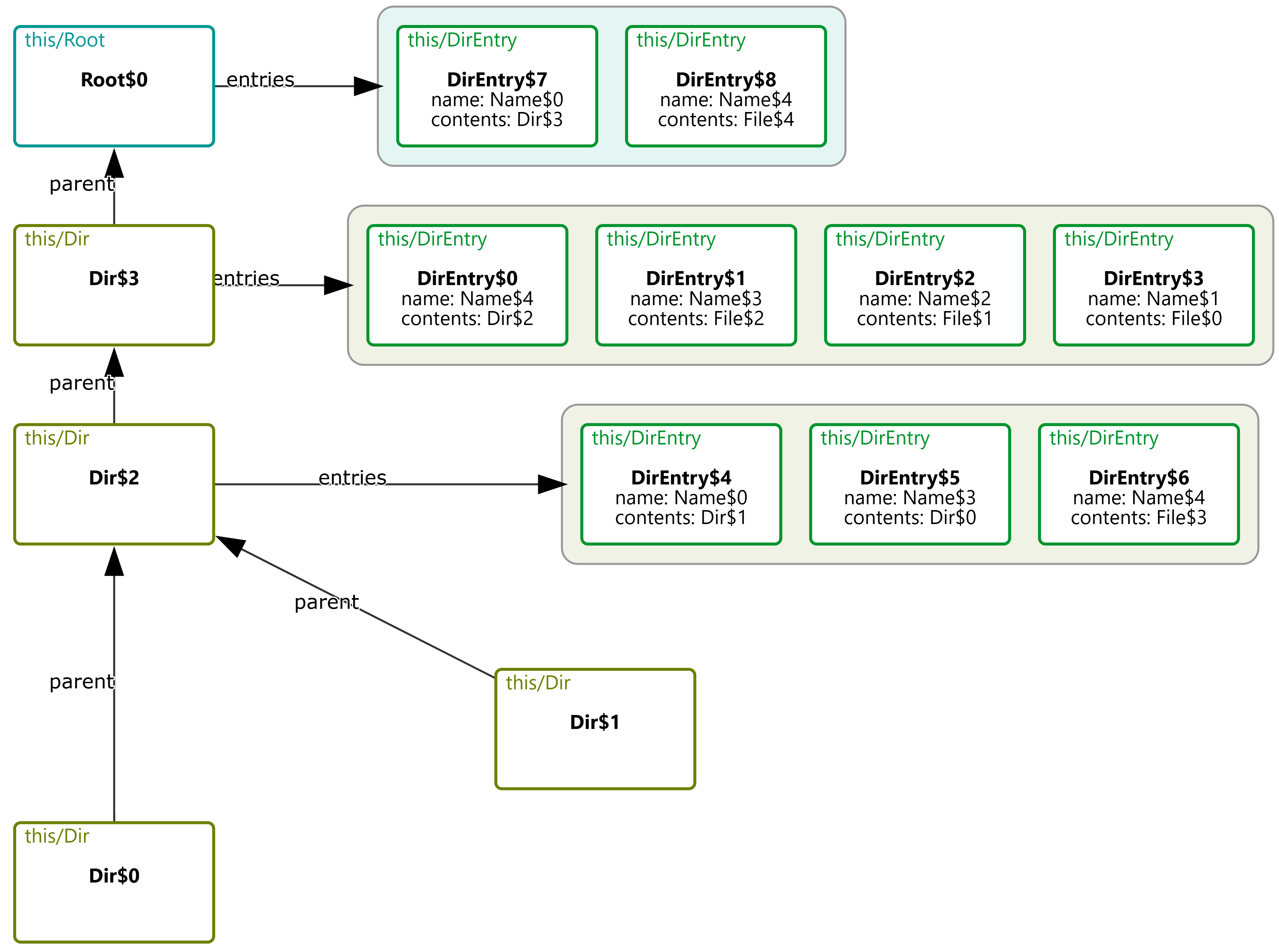
Rather than prioritizing aesthetics, CnD focuses on encoding the spatial intuitions implicit in communicating the model. Its lightweight, declarative structure captures these relationships directly.
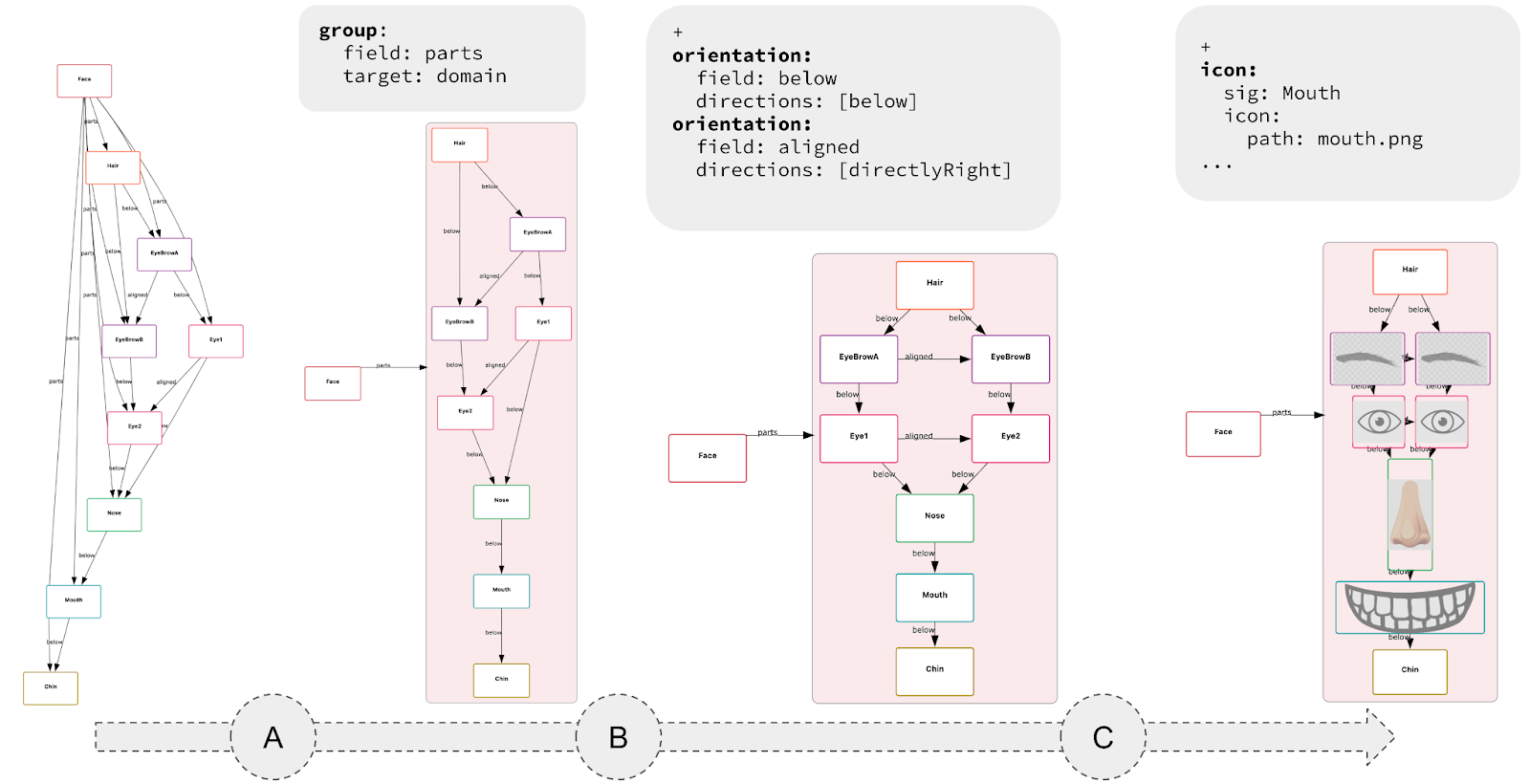
-
Lightweight Specs, Not Programs: Diagramming with CnD resembles writing a spec, not coding a full program. An empty spec yields a default diagram; each constraint refines it. Unlike traditional viz tools like D3 (where you don’t get a visualization until you’ve written a full program) CnD supports incremental visualization, making it easy to start and evolve alongside your model.
- Useful, not pretty: Generated diagrams may lack the visual polish of more sophisticated tools, but they prioritize structural clarity and correctness over style.The trade-off is a lower ceiling: user’s have less fine-grained control over how diagram elements are rendered (e.g., spacing, fonts, shapes).
-
Fail Loudly: CnD constraints are hard constraints. When a diagram fails to match the model, the system prevents visualization and produces a solver-generated error.
For instance, a CnD specification for a binary tree might encode tree layouts as two constraints (lay the left child below and to the left of its parent, and the right child below and to the right of the parent). When faced with the DAG described earlier, CnD identifies that these visualization constraints are unsatisfiable, and produces an error message instead of a misleading diagram.
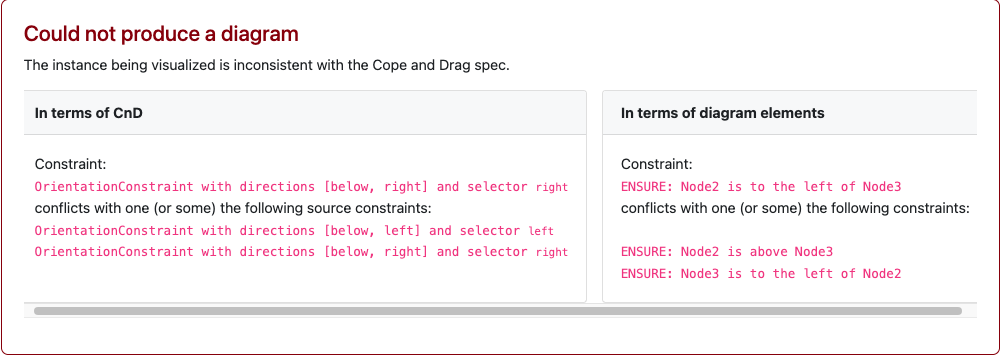
CnD isn’t the final word on diagramming. It’s one design point in a larger landscape, trading visual polish for ease of use, structural clarity, and exploration of model-diagram mismatches. Other tools will (and should) explore different trade-offs.
CnD is embedded in an open-source visualizer for Forge. We encourage you to try it as part of your existing Forge workflows. To learn more about CnD, please read our paper!
Argus: Interactively Debugging Rust trait Errors
Tags: Rust, Tools, Types, User Studies
Posted on 29 April 2025.Traits are a source of bewildering error messages in the Rust community and people have spent money and time trying to improve the resulting diagnostics. We took a different approach. We analyzed a community suite of difficult-to-debug trait errors and formed hypotheses about why they were difficult for engineers to debug. Then, we built an interactive debugger that developers can use in the IDE to debug trait errors. Find more details about our process, the tool, and our paper in our Cognitive Engineering Lab blog post.
LTL Tutor
Tags: Linear Temporal Logic, Education, Formal Methods, Misconceptions, Properties, Tools, Verification
Posted on 08 August 2024.We have been engaged in a multi-year project to improve education in Linear Temporal Logic (LTL) [Blog Post 1, Blog Post 2]. In particular, we have arrived at a detailed understanding of typical misconceptions that learners and even experts have. Our useful outcome from our studies is a set of instruments (think “quizzes”) that instructors can deploy in their classes to understand how well their students understand the logic and what weaknesses they have.
However, as educators, we recognize that it isn’t always easy to add new materials to classes. Furthermore, your students make certain mistakes—now what? They need explanations of what went wrong, need additional drill problems, and need checks whether they got the additional ones right. It’s hard for an educator to make time for all that. And if one is an independent learner, they don’t even have access to such educators.
Recognizing these practical difficulties, we have distilled our group’s expertise in LTL into a free online tutor:
We have leveraged insights from our studies to create a tool designed to be used by learners with minimal prior instruction. All you need is a brief introduction to LTL (or even just propositional logic) to get started. As an instructor, you can deliver your usual lecture on the topic (using your preferred framing), and then have your students use the tool to grow and to reinforce their learning.
In contrast to traditional tutoring systems, which are often tied to a specific curriculum or course, our tutor adaptively generates multiple-choice question-sets in the context of common LTL misconceptions.
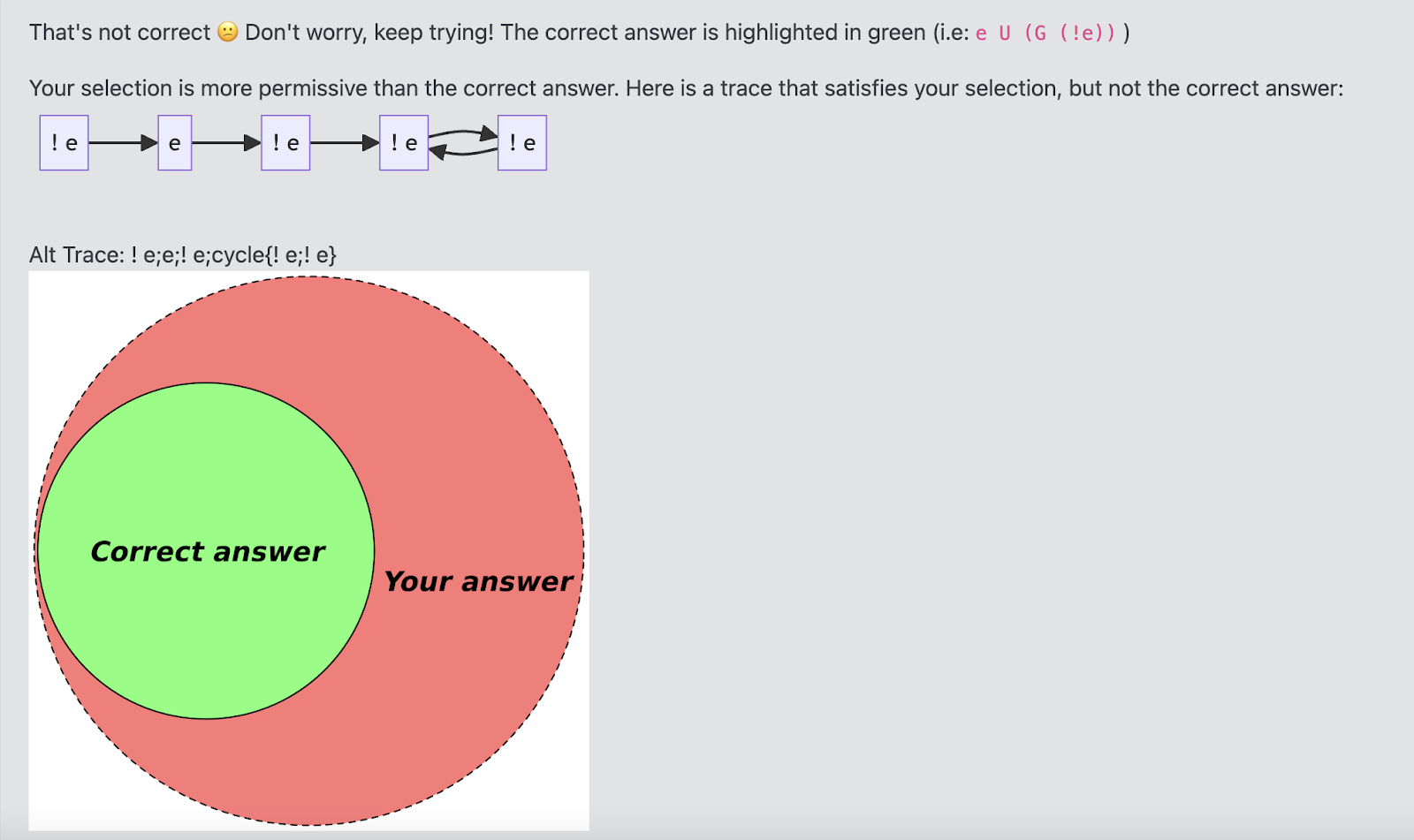
- The tutor provides students who get a question wrong with feedback in terms of their answer’s relationship to the correct answer. Feedback can take the form of visual metaphors, counterexamples, or an interactive trace-stepper that shows the evaluation of an LTL formula across time.
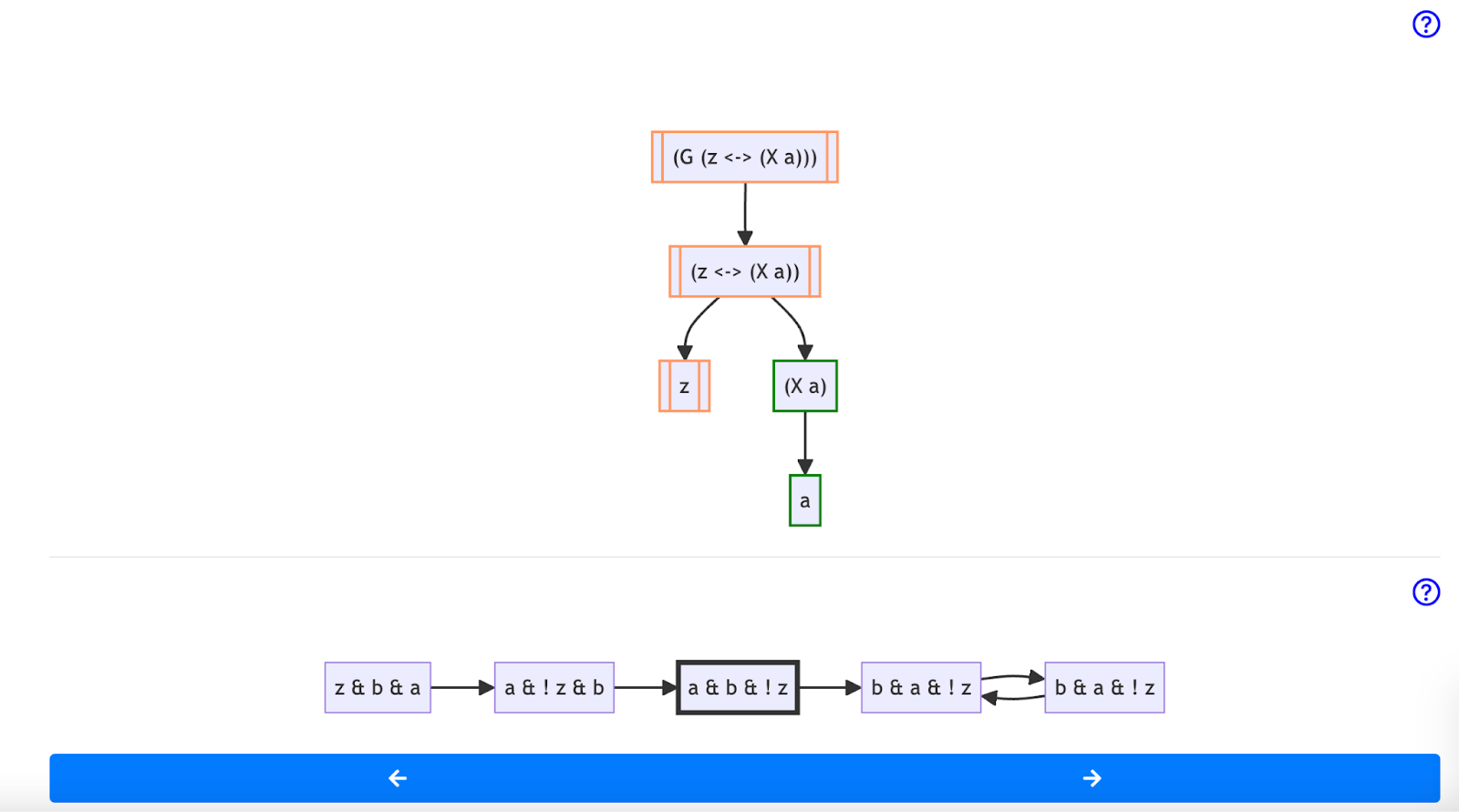
(G (z <-> X(a))) in the third state of a trace. While the overall formula is not satisfied at this moment in time, the sub-formula (X a) is satisfied. This allows learners to explore where their understanding of a formula may have diverged from the correct answer.
- If learners consistently demonstrate the same misconception, the tutor provides them further insight in the form of tailored text grounded in our previous research.
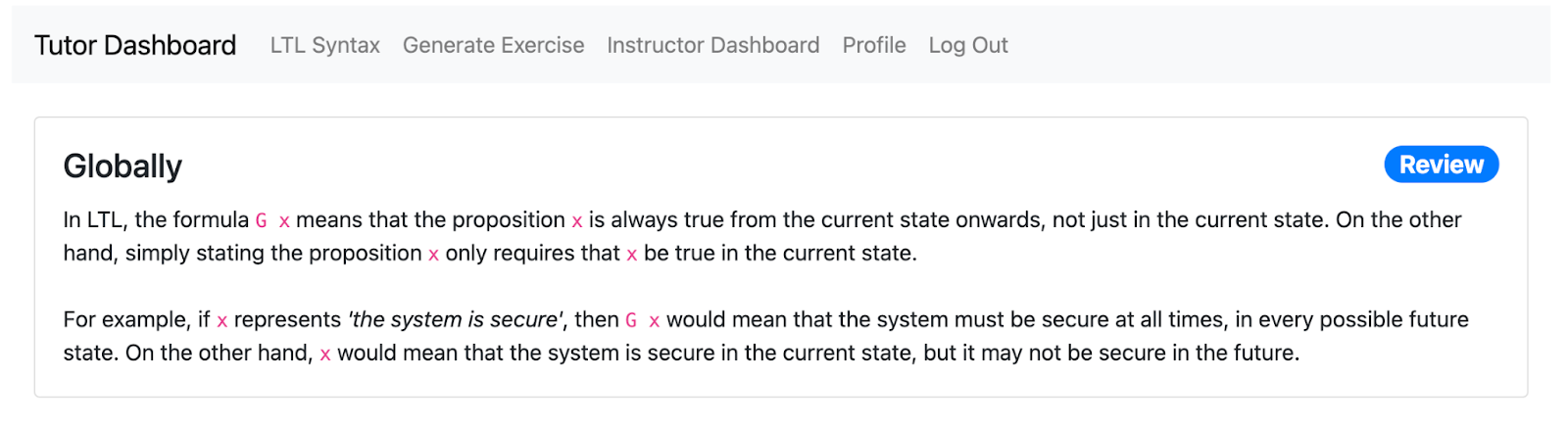
- Once it has a history of misconceptions exhibited by the student, the tutor generates novel, personalized question sets designed to drill students on their specific weaknesses. As students use the tutor, the system updates its understanding of their evolving needs, generating question sets to address newly uncovered or pertinent areas of difficulty.
We also designed the LTL Tutor with practical instructor needs in mind:
- Curriculum Agnostic: The LTL Tutor is flexible and not tied to any specific curriculum. You can seamlessly integrate it into your existing course without making significant changes. It both generates exercises for students and allows you to import your own problem sets.
- Detailed Reporting: To track your class’s progress effectively, you can create a unique course code for your students to enter, so you can get detailed insights into their performance.
- Self-Hostable: If you prefer to have full control over your data, the LTL Tutor can easily be self-hosted.
To learn more about the Tutor, please read our paper!
Forge: A Tool to Teach Formal Methods
Tags: Education, Formal Methods, Properties, Tools, User Studies, Verification, Visualization
Posted on 21 April 2024.For the past decade we have been studying how best to get students into formal methods (FM). Our focus is not on the 10% or so of students who will automatically gravitate towards it, but on the “other 90%” who don’t view it as a fundamental part of their existence (or of the universe). In particular, we decided to infuse FM thinking into the students who go off to build systems. Hence the course, Logic for Systems.
The bulk of the course focuses on solver-based formal methods. In particular, we began by using Alloy. Alloy comes with numerous benefits: it feels like a programming language, it can “Run” code like an IDE, it can be used for both verification and state-exploration, it comes with a nice visualizer, and it allows lightweight exploration with gradual refinement.
Unfortunately, over the years we have also run into various issues with Alloy, a full catalog of which is in the paper. In response, we have built a new FM tool called Forge. Forge is distinguished by the following three features:
-
Rather than plunging students into the full complexity of Alloy’s language, we instead layer it into a series of language levels.
-
We use the Sterling visualizer by default, which you can think of as a better version of Alloy’s visualizer. But there’s much more! Sterling allows you to craft custom visualizations. We use this to create domain-specific visualizations. As we show in the paper, the default visualization can produce unhelpful, confusing, or even outright misleading images. Custom visualization takes care of these.
-
In the past, we have explored property-based testing as a way to get students on the road from programming to FM. In turn, we are asking the question, “What does testing look like in this FM setting?” Forge provides preliminary answers, with more to come.
Just to whet your appetite, here is an example of what a default Sterling output looks like (Alloy’s visualizer would produce something similar, with fewer distinct colors, making it arguably even harder to see):
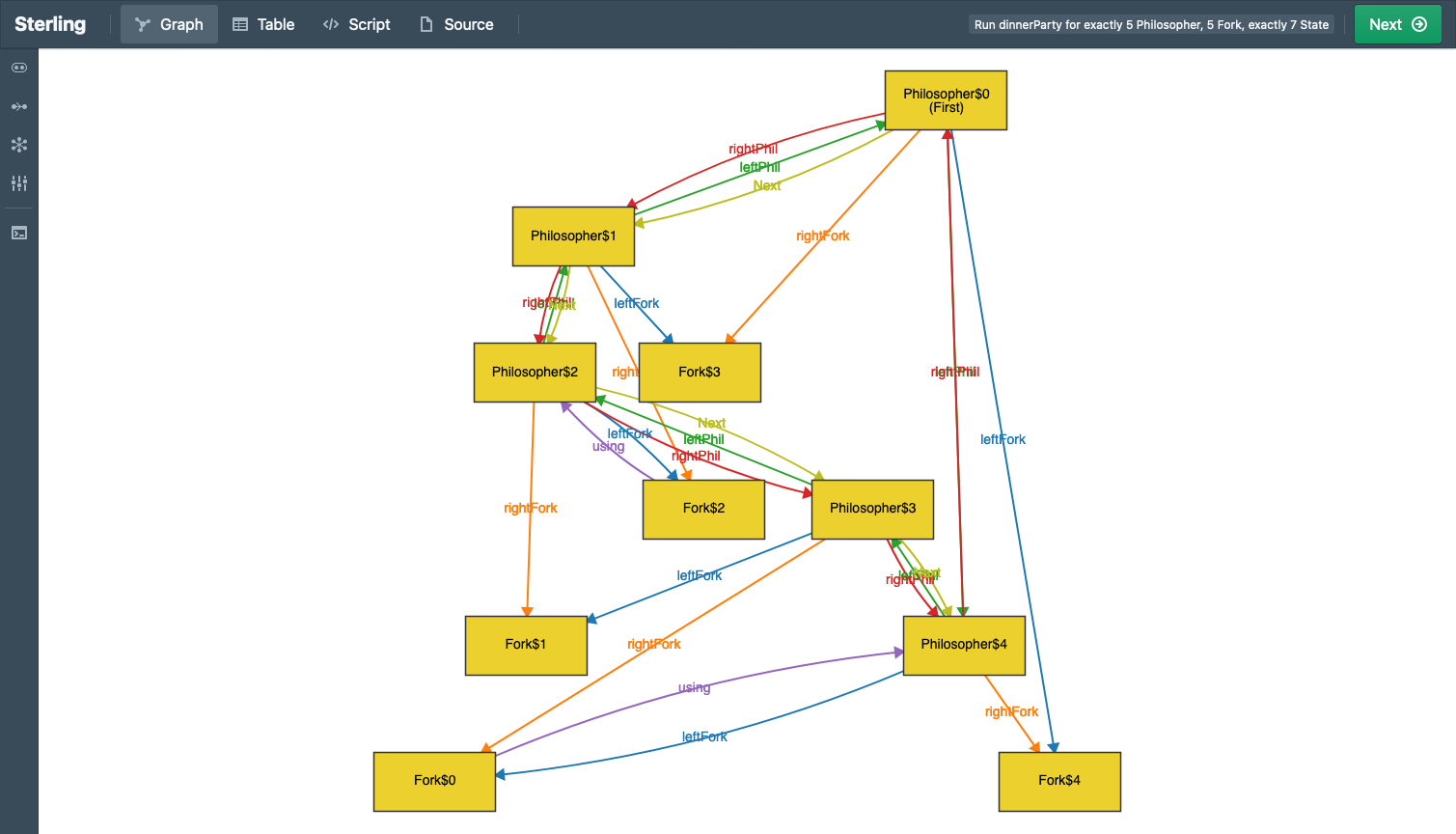
Here’s what custom visualization shows:
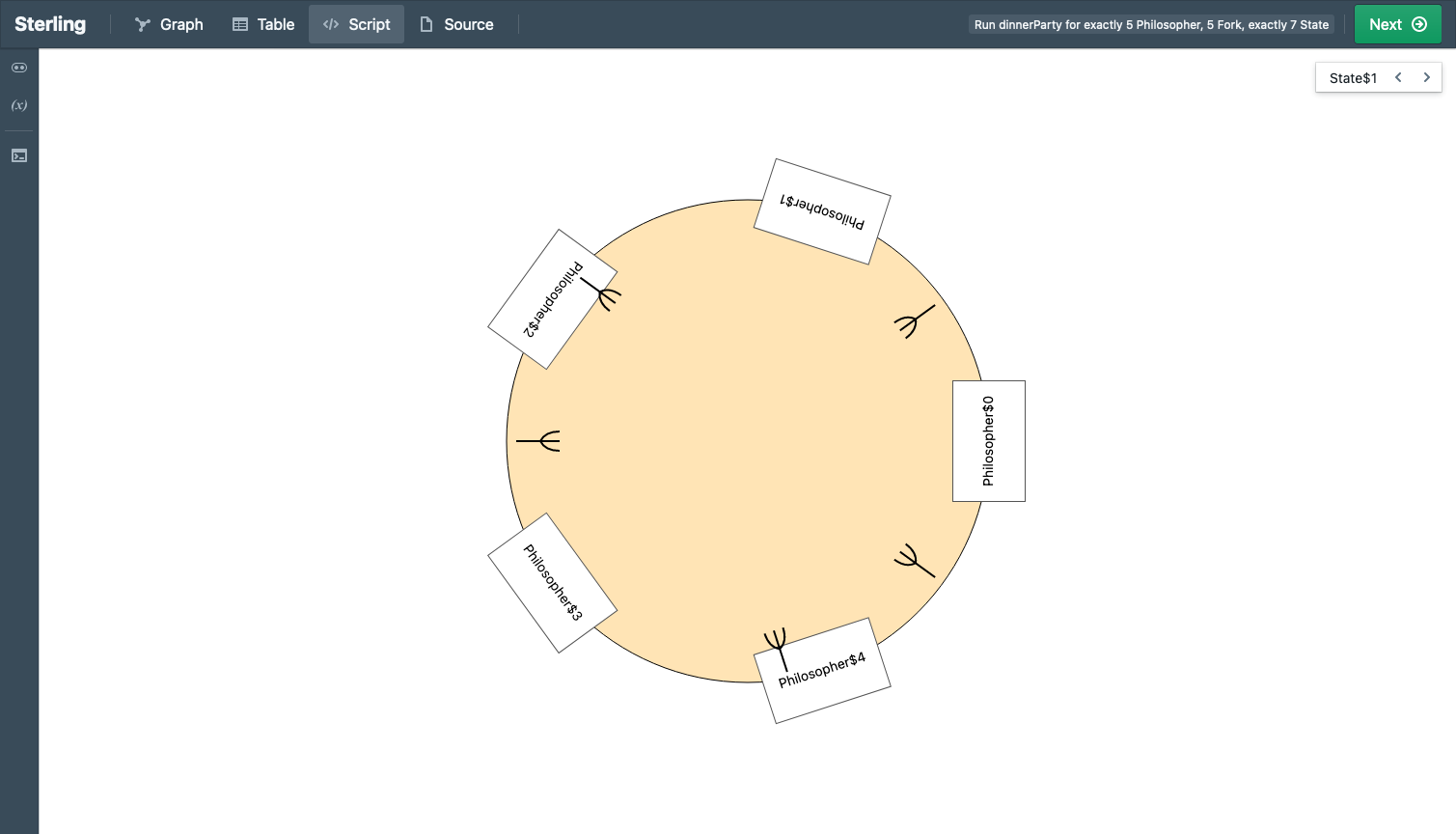
See the difference?
For more details, see the paper. And please try out Forge!
Acknowledgements
We are grateful for support from the U.S. National Science Foundation (award #2208731).
Finding and Fixing Standard Misconceptions About Program Behavior
Tags: Education, Misconceptions, Semantics, Tools, User Studies
Posted on 12 April 2024.A large number of modern languages — from Java and C# to Python and JavaScript to Racket and OCaml — share a common semantic core:
- variables are lexically scoped
- scope can be nested
- evaluation is eager
- evaluation is sequential (per “thread”)
- variables are mutable, but first-order
- structures (e.g., vectors/arrays and objects) are mutable, and first-class
- functions can be higher-order, and close over lexical bindings
- memory is managed automatically (e.g., garbage collection)
We call this the Standard Model of Languages (SMoL).
SMoL potentially has huge pedagogic benefit:
-
If students master SMoL, they have a good handle on the core of several of these languages.
-
Students may find it easier to port their knowledge between languages: instead of being lost in a sea of different syntax, they can find familiar signposts in the common semantic features. This may also make it easier to learn new languages.
-
The differences between the languages are thrown into sharper contrast.
-
Students can see that, by going beyond syntax, there are several big semantic ideas that underlie all these languages, many of which we consider “best practices” in programming language design.
We have therefore spent the past four years working on the pedagogy of SMoL:
-
Finding errors in the understanding of SMoL program behavior.
-
Finding the (mis)conceptions behind these errors.
-
Collating these into clean instruments that are easy to deploy.
-
Building a tutor to help students correct these misconceptions.
-
Validating all of the above.
We are now ready to present a checkpoint of this effort. We have distilled the essence of this work into a tool:
It identifies and tries to fix student misconceptions. The Tutor assumes users have a baseline of programming knowledge typically found after 1–2 courses: variables, assignments, structured values (like vectors/arrays), functions, and higher-order functions (lambdas). Unlike most tutors, instead of teaching these concepts, it investigates how well the user actually understands them. Wherever the user makes a mistake, the tutor uses an educational device called a refutation text to help them understand where they went wrong and to correct their conception. The Tutor lets the user switch between multiple syntaxes, both so they can work with whichever they find most comfortable (so that syntactic unfamiliarity or discomfort does not itself become a source of errors), and so they can see the semantic unity beneath these languages.
Along the way, to better classify student responses, we invent a concept called the misinterpreter. A misinterpreter is an intentionally incorrect interpreter. Concretely, for each misconception, we create a corresponding misinterpreter: one that has the same semantics as SMoL except on that one feature, where it implements the misconception instead of the correct concept. By making misconceptions executable, we can mechanically check whether student responses correspond to a misconception.
There are many interesting lessons here:
-
Many of the problematic programs are likely to be startlingly simple to experts.
-
The combination of state, aliasing, and functions is complicated for students. (Yet most introductory courses plunge students into this maelstrom of topics without a second thought or care.)
-
Misinterpreters are an interesting concept in their own right, and are likely to have value independent of the above use.
In addition, we have not directly studied the following claims but believe they are well warranted based on observations from this work and from experience teaching and discussing programming languages:
-
In SMoL languages, local and top-level bindings behave the same as the binding induced by a function call. However, students often do not realize that these have a uniform semantics. In part this may be caused by our focus on the “call by” terminology, which focuses on calls (and makes them seem special). We believe it would be an improvement to replace these with “bind by”.
-
We also believe that the terms “call-by-value” and “call-by-reference” are so hopelessly muddled at this point (between students, instructors, blogs, the Web…) that finding better terminology overall would be helpful.
-
The way we informally talk about programming concepts (like “pass a variable”), and the syntactic choices our languages make (like
return x), are almost certainly also sources of confusion. The former can naturally lead students to believe variables are being aliased, and the latter can lead them to believe the variable, rather than its value, is being returned.
For more details about the work, see the paper. The paper is based on an old version of the Tutor, where all programs were presented in parenthetical syntax. The Tutor now supports multiple syntaxes, so you don’t have to worry about being constrained by that. Indeed, it’s being used right now in a course that uses Scala 3.
Most of all, the SMoL Tutor is free to use! We welcome and encourage instructors of programming courses to consider using it — you may be surprised by the mistakes your students make on these seemingly very simple programs. But we also welcome learners of all stripes to give it a try!
The Examplar Project: A Summary
Tags: Education, Misconceptions, Testing, Tools
Posted on 01 January 2024.For the past several years, we have worked on a project called Examplar. This article summarizes the goals and methods of the project and provides pointers to more detailed articles describing it.
Context
When faced with an programming problem, computer science students all-too-often begin their implementations with an incomplete understanding of what the problem is asking, and may not realize until far into their development process (if at all) that they have solved the wrong problem. At best, a student realizes their mistake, suffers from some frustration, and is able to correct it before the final submission deadline. At worst, they might not realize their mistake until they receive feedback on their final submission, depriving them of the intended learning goal of the assignment.
How can we help them with this? A common practice—used across disciplines—is to tell students, “explain the problem in your own words”. This is a fine strategy, except it demands far too much of the student. Any educator who has done this knows that most students rightly stumble through this exercise, usually because they don’t have any better words than are already in the problem statement. So what was meant to be a comprehension exercise becomes a literary one; even if they can restate it very articulately, it may be because of verbal skills, not necessarily indicative of good understanding. And for complex problems, the whole exercise is somewhat futile. It’s all made even more difficult when students are not in their native language, etc.
So we have the kernel of a good idea—asking students to read back their understanding—but words are a poor medium for it.
Examples
Our idea is that writing examples—using the syntax of text cases—is a great way to express understanding:
-
Examples are concrete.
-
It’s hard to be vague.
-
Difficulty writing down examples is usually indicative of broader difficulties with the problem, and a great, concrete way to initiate a discussion with course staff.
-
It gets a head-start on writing tests, which too many computing curricula undervalue (if they tackle it at all).
Best of all, because the examples are executable, they can be run against implementations so that students get immediate feedback.
Types of Feedback
We want to give two kinds of feedback:
-
Correctness: Are they even correct? Do they match the problem specification?
-
Thoroughness: How much of the problem space do they cover? Do they dodge misconceptions?
Consider (for example!) the median function. Here are two examples, in the syntax of Pyret:
check:
  median([list: 1, 2, 3]) is 2
  median([list: 1, 3, 5]) is 3
end
These are both correct, as running them against a correct implementation of median will confirm, but are they thorough?
A student could, for instance, easily mistake median for mean. Note that the two examples above do not distinguish between the two functions! So giving students a thumbs-up at this point may still send them down the wrong path: they haven’t expressed enough of an understanding of the problem.
Evaluating Examples
For this reason, Examplar runs a program against multiple implementations. One is a correct implementation (which we call the wheat). (For technical reasons, it can be useful to have more than one correct implementation; see more below.) There are also several buggy implementations (called chaffs). Each example is first run against the wheat, to make sure it conforms to the problem specification. It is then run against each of the chaffs. Here’s what a recent version looks like:
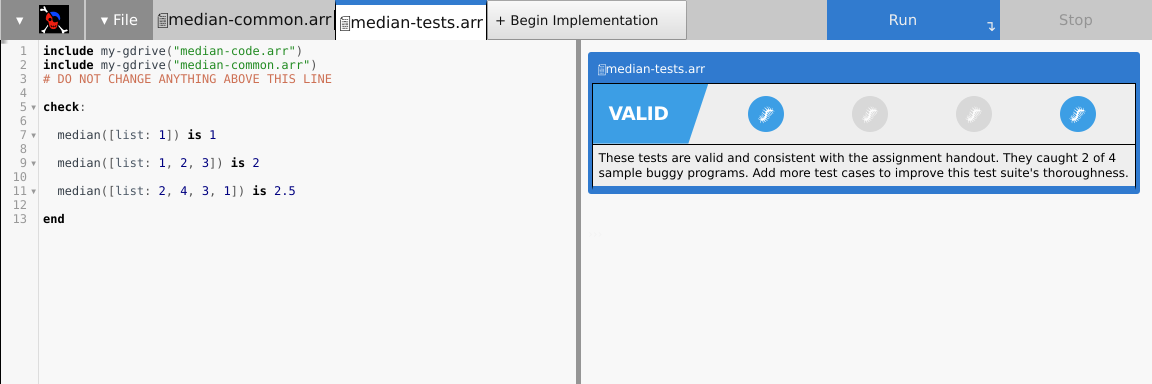
Every example is a classifier: its job is to classify a program as correct or incorrect, i.e., to separate the wheat from the chaff. Of course, a particular buggy implementation may not be buggy in a way that a particular example catches. But across the board, the collection of examples should do a fairly good job of catching the buggy examples.
Thus, for instance, one of our buggy implementations of median would be mean. Because the two examples above are consistent with mean as well, they would (incorrectly) pass mean instead of signaling an error. If we had no other examples in our suite, we would fail to catch mean as buggy. That reflects directly as “the student has not yet confirmed that they understand the difference between the two functions”. We would want students to add examples like
median([list: 1, 3, 7]) is 3
that pass median but not mean to demonstrate that they have that understanding.
Answering Questions
Examplar is also useful as a “24 hour TA”. Consider this example:
median([list: 1, 2, 3, 4]) is ???
What is the answer? There are three possible answers: the left-median (2), right-median (3), and mean-median (2.5). A student could post on a forum and wait for a course staffer to read and answer. Or they can simply formulate the question as a test: e.g.,
median([list: 1, 2, 3, 4]) is 2.5
One of these three will pass the wheat. That tells the student the definition being used for this course, which may not have been fully specified in the problem statement. Similarly:
median([list: ]) is ??? # the empty list
Indeed, we see students coming to course staff with questions like, “I see that Examplar said that …, and I wanted to know why this is the answer”, which is a fantastic kind of question to hear.
Whence Chaffs?
It’s easy to see where to get the wheat: it’s just a correct implementation of the problem. But how do we get chaffs?
An astute reader will have noticed that we are practicing a form of mutation testing. Therefore, it might be tempting to use mutation testing libraries to generate chaffs. This would be a mistake because it misunderstands the point of Examplar.
We want students to use Examplar before they start programming, and as a warm-up activity to get their minds into the right problem space. That is not the time to be developing a test suite so extensive that it can capture every strange kind of error that might arise. Rather, we think of Examplar as performing what we call conceptual mutation testing: we only want to make sure they have the right conception of the problem, and avoid misconceptions about it. Therefore, chaffs should correspond to high-level conceptual mistakes (like confusing median and mean), not low-level programming errors.
Whence Misconceptions?
There are many ways to find out what misconceptions students have. One is by studying the errors we ourselves make while formulating or solving the problem. Another is by seeing what kinds of questions they ask course staff and what corrections we need to make. But there’s one more interesting and subtle source: Examplar itself!
Remember how we said we want examples to first pass the wheat? The failing ones are obviously…well, they’re wrong, but they may be wrong for an interesting reason. For instance, suppose we’ve defined median to produce the mean-median. Now, if a student writes
median([list: 1, 2, 3, 4]) is 3
they are essentially expressing their belief that they need to solve the right-median problem. Thus, by harvesting these “errors”, filtering, and then clustering them, we can determine what misconceptions students have because they told us—in their own words!
Readings
-
Why you might want more than one wheat: paper
-
Student use without coercion (in other words, gamified interfaces help…sometimes a bit too much): blog; paper
-
What help do students need that Examplar can’t provide? blog; paper
But this work has much earlier origins:
-
How to Design Programs has students write tests before programs. However, these tests are inert (i.e., there’s nothing to run them against), so students see little value in doing so. Examplar eliminates this inertness, and goes further.
-
Before Examplar, we had students provide peer-review on tests, and found it had several benefits: paper. We also built a (no longer maintained) programming environment to support peer review: paper.
-
One thing we learned is that these test suites can grow too large to generate useful feedback. This caused us to focus on the essential test cases, out of which the idea of examples (as opposed to tests) evolved: paper.
Conceptual Mutation Testing
Tags: Education, Misconceptions, Testing, Tools, User Studies
Posted on 31 October 2023.Here’s a summary of the full arc, including later work, of the Examplar project.
The Examplar system is designed to solve the documented phenomenon that students often misunderstand a programming problem statement and hence “solve” the wrong problem. It does so by asking students to begin by writing input/output examples of program behavior, and evaluating them against correct and buggy implementations of the solution. Students refine and demonstrate their understanding of the problem by writing examples that correctly classify these implementations.
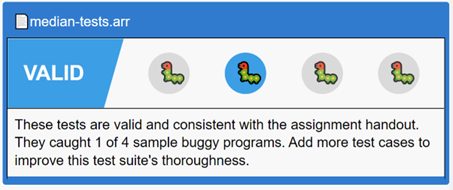
It is, however, very difficult to come up with good buggy candidates. These programs must correspond to the problem misconceptions students are most likely to have. Students can, otherwise, end up spending too much time catching them, and not enough time on the actual programming task. Additionally, a small number of very effective buggy implementations is far more useful than either a large number or ineffective ones (much less both).
Our previous research has shown that student-authored examples that fail the correct implementation often correspond to student misconceptions. Buggy implementations based on these misconceptions circumvent many of the pitfalls of expert-generated equivalents (most notably the ‘expert blind spot’). That work, however, leaves unanswered the crucial question of how to operationalize class-sourced misconceptions. Even a modestly sized class can generate thousands of failing examples per assignment. It takes a huge amount of manual effort, expertise, and time to extract misconceptions from this sea of failing examples.
The key is to cluster these failing examples. The obvious clustering method – syntactic – fails miserably: small syntactic differences can result in large semantic differences, and vice versa (as the paper shows). Instead, we need a clustering technique that is based on the semantics of the problem.
This paper instead presents a conceptual clustering technique based on key characteristics of each programming assignment. These clusters dramatically shrink the space that must be examined by course staff, and naturally suggest techniques for choosing buggy implementation suites. We demonstrate that these curated buggy implementations better reflect student misunderstandings than those generated purely by course staff. Finally, the paper suggests further avenues for operationalizing student misconceptions, including the generation of targeted hints.
You can learn more about the work from the paper.
Identifying Problem Misconceptions
Tags: Education, Misconceptions, Testing, Tools
Posted on 15 October 2022.Here’s a summary of the full arc, including later work, of the Examplar project.
Our recent work is built on the documented research that students often misunderstand a programming problem statement and hence “solve” the wrong problem. This not only creates frustration and wastes time, it also robs them of whatever learning objective motivated the task.
To address this, the Examplar system asks students to first write examples. These examples are evaluated against wheats (correct implementations) and chaffs (buggy implementations). Examples must pass the wheat, and correctly identify as wrong as many chaffs as possible. Prior work explores this and shows that it is quite effective.
However, there’s a problem with chaffs. Students can end up spending too much time catching them, and not enough time on the actual programming task. Therefore, you want chaffs that correspond to the problem misconceptions students are most likely to have. Having a small number of very effective chaffs is far more useful than either a large number or ineffective ones (much less both). But the open question has always been, how do we obtain chaffs?
Previously, chaffs were created by hand by experts. This was problematic because it forces experts to imagine the kinds of problems students might have; this is not only hard, it is bound to run into expert blind spots. What other method do we have?
This work is based on a very simple, clever observation: any time an example fails a wheat, it may correspond to a student misconception. Of course, not all wheat failures are misconceptions! It could be a typo, it could be a basic logical error, or it could even be an attempt to game the wheat-chaff system. Do we know in what ratio these occur, and can we use the ones that are misconceptions?
This paper makes two main contributions:
-
It shows that that many wheat failures really are misconceptions.
-
It uses these misconceptions to formulate new chaffs, and shows that they compare very favorably to expert-generated chaffs.
Furthermore, the work spans two kinds of courses: one is an accelerated introductory programming class, while the other is an upper-level formal methods course. We show that there is value in both settings.
This is just a first step in this direction; a lot of manual work went into this research, which needs to be automated; we also need to measure the direct impact on students. But it’s a very promising direction in a few ways:
-
It presents a novel method for finding misconceptions.
-
It naturally works around expert blind-spots.
-
With more automation, it can be made lightweight.
In particular, if we can make it lightweight, we can apply it to settings—even individual homework problems—that also manifest misconceptions that need fixing, but could never afford heavyweight concept-inventory-like methods for identifying them.
You can learn more about the work from the paper.
Student Help-Seeking for (Un)Specified Behaviors
Tags: Education, Misconceptions, Testing, Tools, User Studies
Posted on 02 October 2021.Here’s a summary of the full arc, including later work, of the Examplar project.
Over the years we have done a lot of work on Examplar, our system for helping students understand the problem before they start implementing it. Given that students will even use it voluntarily (perhaps even too much), it would seem to be a success story.
However, a full and fair scientific account of Examplar should also examine where it fails. To that end, we conducted an extensive investigation of all the posts students made on our course help forum for a whole semester, identified which posts had to do with problem specification (and under-specification!), and categorized how helpful or unhelpful Examplar was.
The good news is we saw several cases where Examplar had been directly helpful to students. These should indeed be considered a lower-bound, because the point of Examplar is to “answer” many questions directly, so they would never even make it onto the help forum.
But there is also bad news. To wit:
-
Students sometimes simply fail to use Examplar’s feedback; is this a shortcoming of the UI, of the training, or something inherent to how students interact with such systems?
-
Students tend to overly focus on inputs, which are only a part of the suite of examples.
-
Students do not transfer lessons from earlier assignments to later ones.
-
Students have various preconceptions about problem statements, such as imagining functionality not asked for or constraints not imposed.
-
Students enlarge the specification beyond what was written.
-
Students sometimes just don’t understand Examplar.
These serve to spur future research in this field, and may also point to the limits of automated assistance.
To learn more about this work, and in particular to get the points above fleshed out, see our paper!
Adding Function Transformers to CODAP
Tags: Higher-Order Functions, Education, Tables, Tools
Posted on 22 August 2021.CODAP is a wonderful tool for data transformation. However, it also has important limitations, especially from the perspective of our curricula. So we’ve set about addressing them so that we can incorporate CODAP into our teaching.
CODAP
We at Brown PLT and Bootstrap are big fans of CODAP, a data-analysis tool from the Concord Consortium. CODAP has very pleasant support for working with tables and generating plots, and we often turn to it to perform a quick analysis and generate a graph.
One of the nice things about CODAP, that sets it apart from traditional spreadsheets, is that the basic unit of space is not a table or spreadsheet but a desktop that can contain several objects on it. A workspace can therefore contain many objects side-by-side: a table, a graph, some text, etc.:
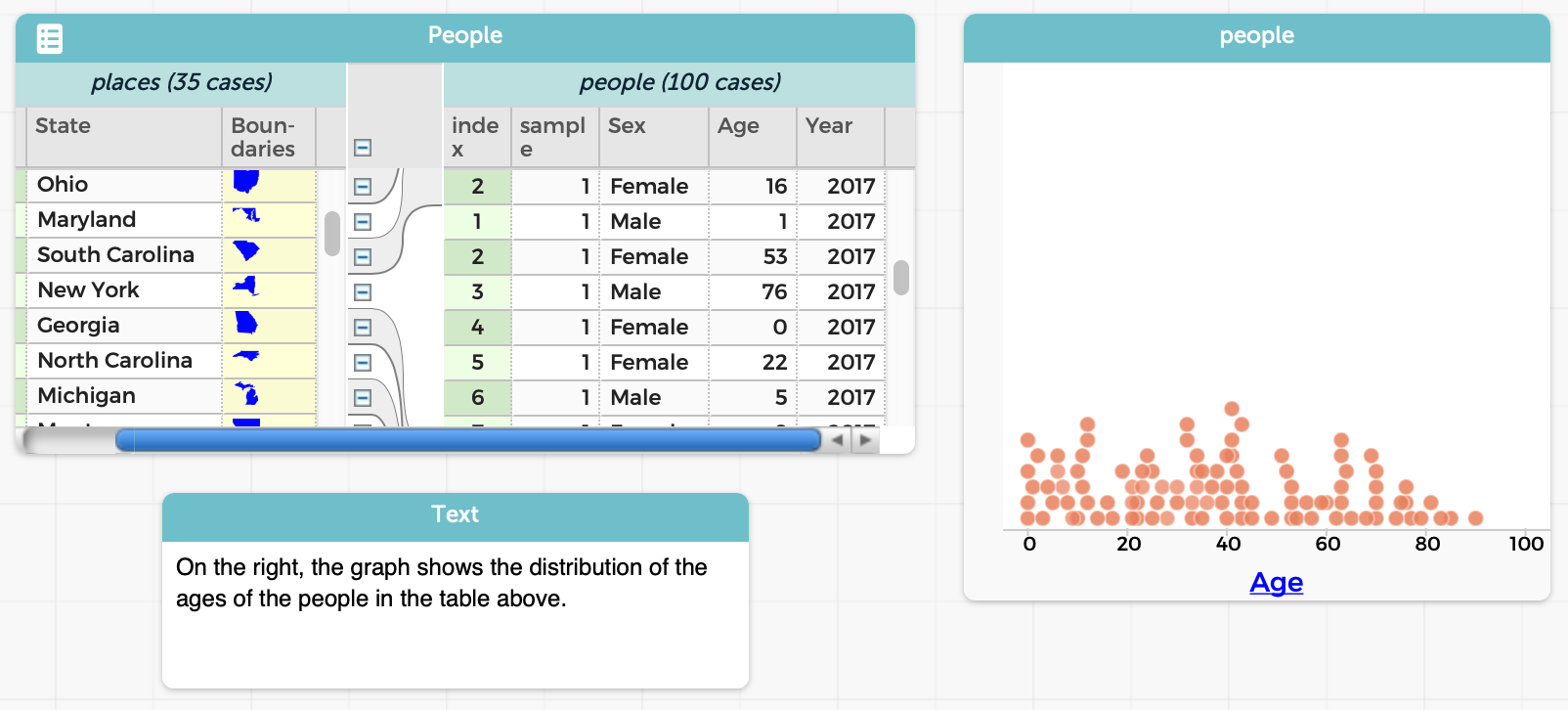
Also, a lot of things in CODAP are done through direct manipulation. This is helpful for younger students, who may struggle with formal programming but can use a GUI to manipulate objects.
There are many other nice features in CODAP, such as the ability to track a data case cross representations, and so on. We urge you to go try it out! When you launch a new CODAP instance, CODAP will offer you a folder of examples, which can help you get acquainted with it and appreciate its features.
What’s Not to Love?
Unfortunately, we don’t love everything about CODAP. We’ll illustrate with an example. To be clear, this is not a bug in CODAP, but rather an important difference of opinion in ease-of-use.
Let’s say we want to find all the people who are below 50 years of age. In CODAP, there are a few ways to do it, all of which have their issues.
If you don’t mind being imprecise (which may be okay for a quick data exploration, but isn’t if you want to, say, compute a statistic over the result):
- Create a new graph.
- Drag the
Agecolumn to the graph. - Select all the items that are under 50 using visual inspection. (Depending on how much data you have and their spread, you’ll quite possibly under- and/or over-shoot.)
- Then do the last few steps below.
If you care to get an accurate selection, instead begin with:
- First, add a new column to the original table.
- Enter a formula for that column (in this case,
Age < 50). - Obtain a selection of the desired items, which can be done in several different ways, also all with trade-offs:
-
Sort by that column. Unfortunately, this won’t work if there’s grouping in the table. You’d have to select manually. (Try it. This may be a bit harder than it seems.)
-
Create a graph as above, but of the new column. This will give you a clean separation into two values. Manually select all the values in the
truecolumn. At least now it will be visually clear if you didn’t select all the right values (if the dataset is not too large). -
Remove the formula for the new column. Now drag it to the leftmost end of the table. (If you don’t remove the formula, you’ll get an error!) Now you have all the elements grouped by
trueandfalse(and operations performed to one can also be performed to the other).
You’re not done! You still have more steps to go:
- If you aren’t already in the table (e.g., if you made a graph), select the table.
- Click on the “Eye” icon.
- Choose the “Set Aside Unselected Cases” entry.
Note that, in most or all of these cases:
- You’ve added a completely superfluous column to your dataset.
- You may have changed the order of items in your dataset.
- You’ve lost the ability to see the original data alongside the filtered data.
- You had to take numerous steps.
- You had to remember to use the Eye icon for filtering, as opposed to other GUI operations for other tasks.
- You had to remember where the Eye icon even is: it’s hidden when a table isn’t selected.
But most of all, in every single case:
- You had to perform all these operations manually.
Why does this matter? We need data science to be reproducible: we should be able to give others our datasets and scripts so they can re-run them to check that they get the same answer, tweak them so they can check the robustness of our answers, and so on. But when all the operations are done manually, there’s no “script”, only output. That focuses on answers rather than processes, and is anti-reproducibility.
In contrast, we think of filtering as a program operation that we apply to a table to produce a new table, leaving the original intact: e.g., the way it works in Pyret. This addresses almost all of the issues above.
Other Pedagogic Consequences
CODAP had to make certain design choices. They made good choices for some settings: for younger children, in particular, the direct manipulation interface works very nicely. It’s a low floor. However, we feel it’s also a lower-than-we’d-like ceiling. There are many things that the CODAP view of data transformation inhibits:
- Making operations explicit, as we noted above.
- Introducing the idea of functions or transformations of data as objects in their own right, not only as manual operations.
- Having explicit data-transformation functions also connects to other related school curricula, such as algebra.
- Saving and naming repeated operations, to learn a bottom-up process of developing abstractions.
- Examining old and new tables side-by-side.
This last point is especially important. A critical task in data science is performing “what if” analyses. What-if fundamentally means we should be able to perform some operation (the “if” part) and compare the output (the “what” part). We might even want to look at multiple different scenarios, representing different possible outcomes. But traditional what-if analysis, whether in CODAP or on spreadsheets, often requires you, the human, to remember what has changed, rather than letting the computer do it for you. (Microsoft Excel has limited support to get around this, but its very presence indicates that spreadsheets, traditionally, did not support what-if analysis—even though that’s how they have often been marketed.)
Finally, there’s also a subtle consequence to CODAP’s design: derived tables must look substantially similar to their parents. In computing terms, the schema should be largely the same. That works fine when an operation has little impact on the schema: filtering doesn’t change the schema at all (in principle, though in CODAP you have to add an extra column…), and adding a new column is a conservative extension. But what if you want to perform an operation that results in a radically different schema? For instance, consider the “pivot wider” and “pivot longer” operations when we create tidy data. The results of those operations have substantially different schemas!
Introducing CODAP Transformers
In response to this critique, we’ve added a new plugin to CODAP called Transformers:
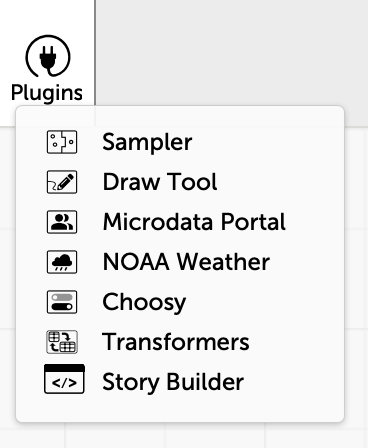
(This work was done by undergrad trio Paul Biberstein, Thomas Castleman, and Jason Chen.)
This introduces a new pane that lists several transformation operations, grouped by functionality:
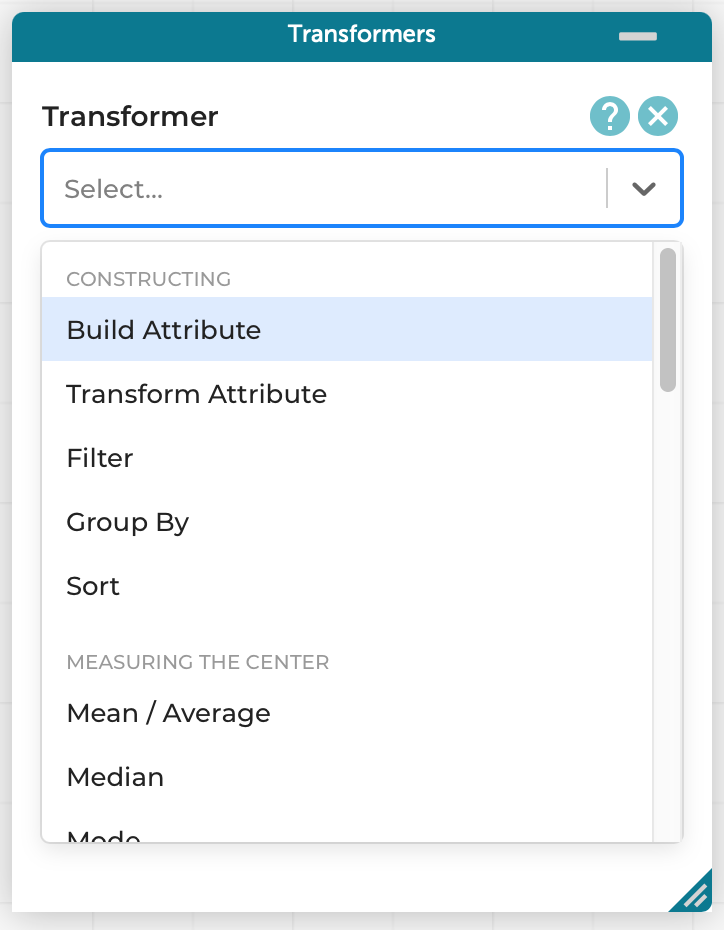
For instance, with no more textual programming than before (the formula is the same), we can perform our same example as before, i.e., finding all the people younger than 50:
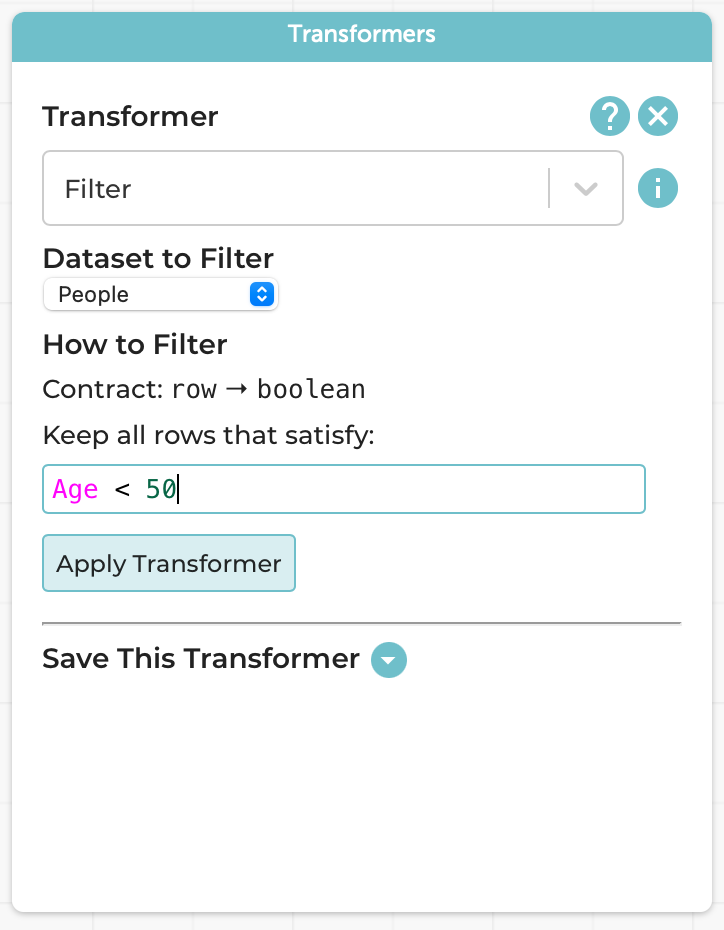
The result is a new table, which co-exists with the original:
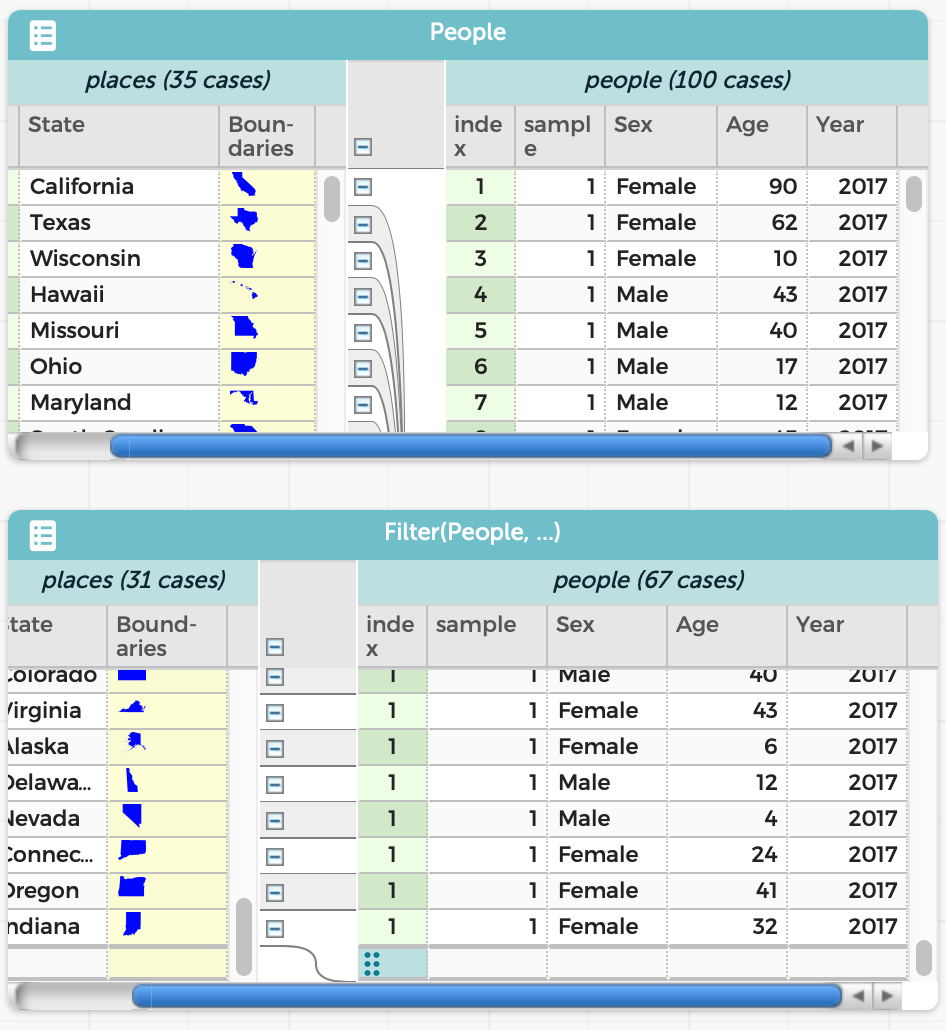
The resulting table is just as much a table as the original. For instance, we can graph the ages in the two tables and see exactly the difference we’d expect:
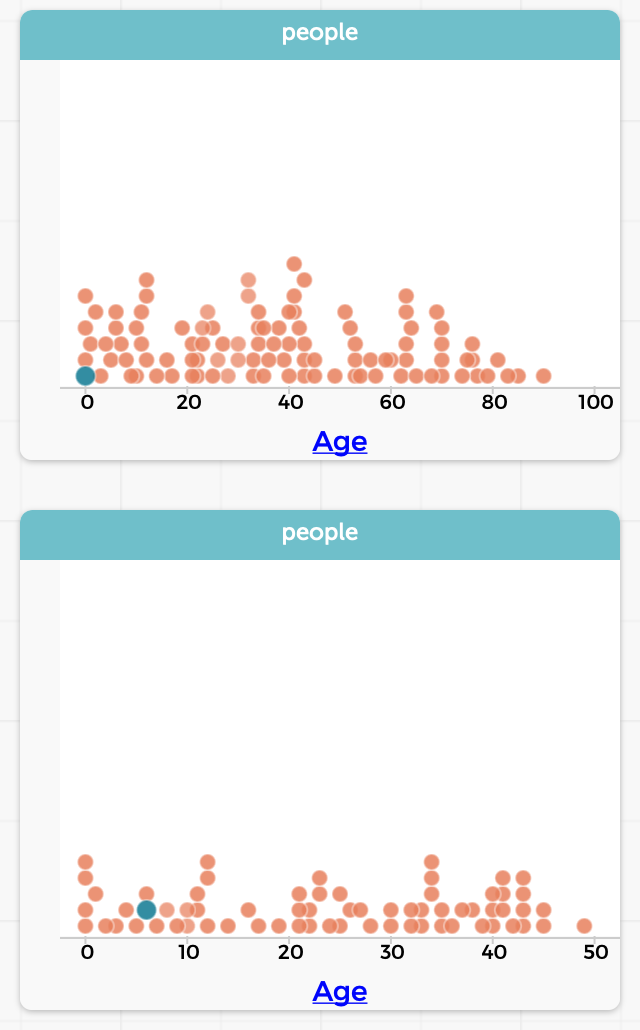
(Over time, of course, you may build up many tables. The Transformers plugin chooses names based on the operations, to make them easy to tell apart. CODAP also lets you resize, minimize, and delete tables. In practice, we don’t expect users to have more than 3–4 tables up at a time.)
Saving Transformers
We might want to perform the same operation on multiple tables. This is valuable in several contexts:
-
We create a hand-curated table, with known answers, as a test case to make sure our operations perform what we expect. After confirming this, we want to be sure that we applied the exact same operation to the real dataset.
-
We want to perform the same operation to several related datasets: e.g., a table per year.
We might also simply want to give a meaningful name to the operation.
In such cases, we can use the “Save This Transformer” option at the bottom of the Transformers pane:
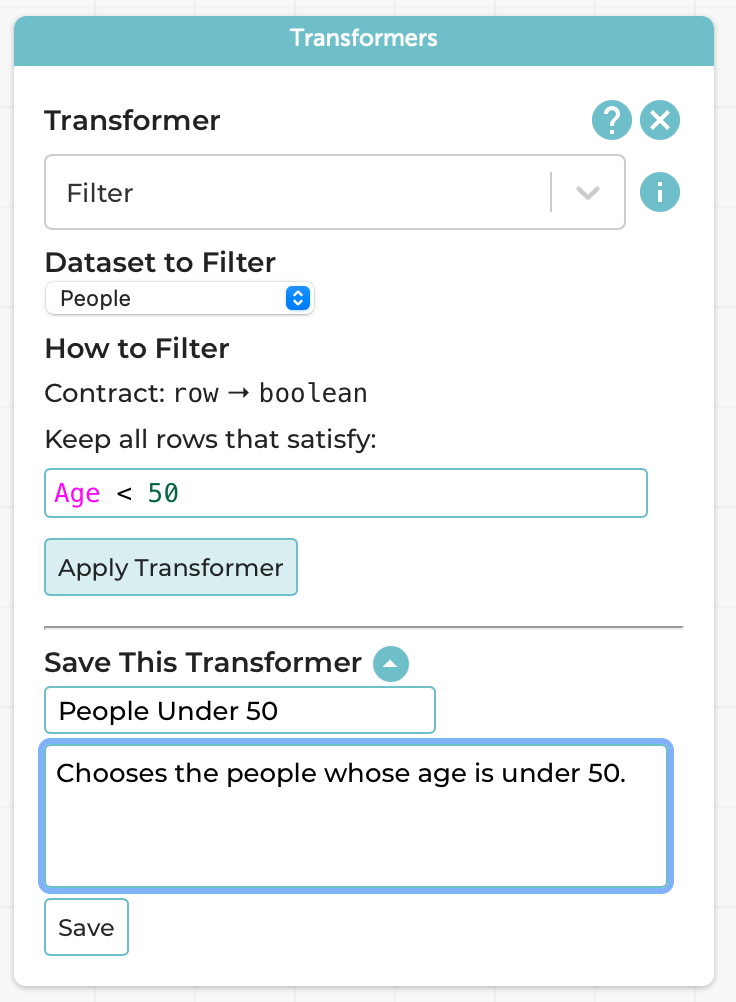
Following the programming processes we follow and teach, we naturally want you to think about the Design Recipe steps when saving it because, in programming terms, you’re creating a new function.
This now creates a new named transformer:
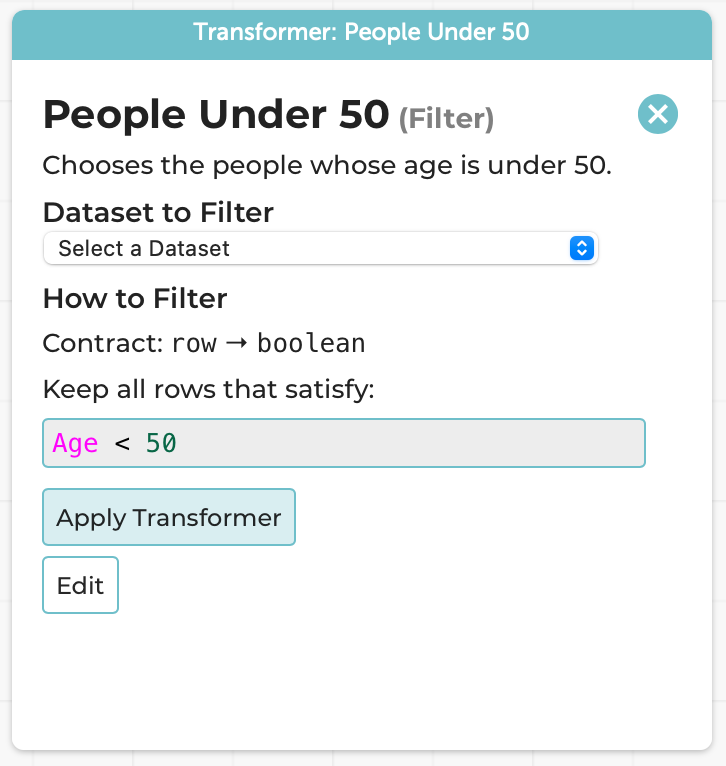
Every part of this is frozen other than the choice of dataset; it can be applied as many times as you want, to as many datasets as you want. The above use-cases are suggestions, but you can use it however you wish.
A Note on Errors
Suppose you try to apply an operation improperly. Say, for instance, you have a table of people that does not have an Age column, and you try to filter people with Age < 50. There are at least two choices that Transformers can take:
-
Allow you to try to perform the operation, and report an error.
-
Prevent you from even trying by simply not showing tables that are invalid in the drop-down list of tables that the operation can be applied to.
We know exactly what the programming languages reader reading this is thinking: “You’re going to choose the latter, right? Right?!? PLEASE TELL ME YOU ARE!!!”
Gentle Reader: we’re not.
Here’s why we chose not to.
- There’s the messy implementation detail of figuring out exactly when a table should or shouldn’t be shown in the drop-down. And we’d have to maintain that across changes to the CODAP language. There are no such problems in the dynamic version.
But hey, we’re language implementors, we can figure these things out. Rather, our real reason comes from human factors:
- Imagine you’re a teacher with a classroom full of students. A student tries to apply an operation to the wrong table. They probably don’t even realize that the operation can’t be applied. All they know is that the table doesn’t appear in the list. Their table doesn’t appear in the list! Their reaction is (perhaps rightly) going to be to raise their hand and say to their teacher, “This tool is broken! It won’t even show me my table!!!” And the teacher, dealing with a whole bunch of students, all in different states, may not immediately realize why the table doesn’t show. Everyone’s frustrated; the student feels stuck, and the teacher may be left feeling inadequate.
In contrast, if we just let the operation happen, here’s what the student sees:
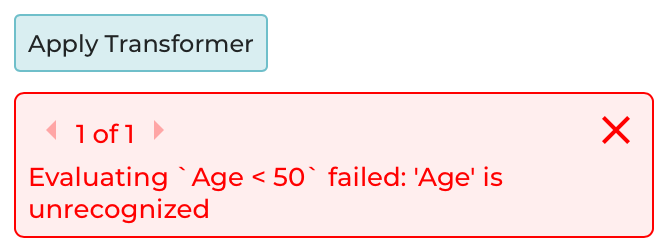
Now the student has a pretty good chance of figuring out for themselves what went wrong: not pulling away the teacher from helping someone else, not blaming the tool, and instead giving themselves a chance of fixing their own problem.
There’s potentially a broader lesson here about making invalid states unrepresentable. Potentially.
Many, Many Transformers!
We’ve focused on just one transformation here. There are many more. We even have the pivoting operations for tidy data! (It would have been wrong to tease you with that up top, otherwise.)
We even take the what-if part seriously: the Compare Transformer lets you compare numeric and categorical data. Believe it or not, the categorical comparison operator was actually inspired by prior work we’ve done for many years on comparing access control policies, router configurations, and SDN programs (see also our two brief position papers). It’s pretty thrilling to see the flow of ideas from security and networking research to data science education in a small but very non-obvious way: the grouping in the categorical output is directly inspired by the multi-terminal decision diagrams of our original Margrave system. For more on this line of work, see our blog post.
Examples
For your benefit, we’ve set up a bunch of pre-built CODAP examples that show you the operations in action:
- Building attributes, Filtering, and Updating data
- Partition
- Filter, Running Sum, and their interaction
- Transformers that produce single values
- Reusing saved transformers
- Categorical Compare
- Numerical Compare
- Pivot operations from tidy data
Make Your Own!
As you might have guessed from the examples above, transformers are now part of the official CODAP tool. You can go play with them right now on the CODAP site. Have fun! Tell us what you learned.
Thanks
Special thanks to our friends at the Concord Consortium, especially William Finzer, Jonathan Sandoe, and Chad Dorsey, for their support.
Students Testing Without Coercion
Tags: Education, Testing, Tools, User Studies
Posted on 20 October 2020.Here’s a summary of the full arc, including later work, of the Examplar project.
It is practically a trope of computing education that students are over-eager to implement, yet woefully under-eager to confirm they understand the problem they are tasked with, or that their implementation matches their expectations. We’ve heard this stereotype couched in various degrees of cynicism, ranging from “students can’t test” to “students won’t test”. We aren’t convinced, and have, for several years now, experimented with nudging students towards early example writing and thorough testing.
We’ve blogged previously about our prototype IDE, Examplar — our experiment in encouraging students to write illustrative examples for their homework assignments before they actually dig into their implementation. Examplar started life as a separate, complementary tool from Pyret’s usual programming environment, providing a buffer just for the purposes of developing a test suite. Clicking Run in Examplar runs the student’s test suite against our implementations (not theirs) and then reports the degree to which the suite was valid and thorough (i.e., good at catching our buggy implementations). With this tool, students could catch their misconceptions before implementing them.
Although usage of this tool was voluntary for all but the first assignment, students relied on it extensively throughout the semester and the quality of final submissions improved drastically compared to prior offerings of the course. Our positive with this prototype encouraged us to fully-integrate Examplar’s feedback into students’ development environment. Examplar’s successor provides a unified environment for the development of both tests and implementation:
This new environment — which provides Examplar-like feedback on every Run — no longer requires that students have the self-awareness to periodically switch to a separate tool. The environment also requires students to first click a “Begin Implementation” button before showing the tab in which they write their implementation.
This unified environment enabled us to study, for the first time, whether students wrote examples early, relative to their implementation progress. We tracked the maximum test thoroughness students had achieved prior to each edit-and-run of their implementations file. Since the IDE notified students of their test thoroughness upon each run, and since students could only increase their thoroughness via edits to their tests file, the mean of these scores summarizes how thoroughly a student explored the problem with tests before fully implementing it.
We find that nearly every student on nearly every assignment achieves some level of thoroughness before their implementation work:
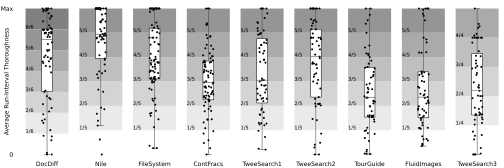
To read more about our design of this environment, its pedagogic context, and our evaluation of students’ development process, check out the full paper here.
Combating Misconceptions by Encouraging Example-Writing
Tags: Education, Misconceptions, Testing, Tools
Posted on 11 January 2020.Here’s a summary of the full arc, including later work, of the Examplar project.
When faced with an unfamiliar programming problem, undergraduate computer science students all-too-often begin their implementations with an incomplete understanding of what the problem is asking, and may not realize until far into their development process (if at all) that they have solved the wrong problem. At best, a student realizes their mistake, suffers from some frustration, and is able to correct it before the final submission deadline. At worst, they might not realize their mistake until they receive feedback on their final submission—depriving them of the intended learning goal of the assignment.
Educators must therefore provide students with some mechanism by which students can evaluate their own understanding of a problem—before they waste time implementing some misconceived variation of that problem. To this end, we provide students with Examplar: an IDE for writing input–output examples that provides on-demand feedback on whether the examples are:
- valid (consistent with the problem), and
- thorough (explore the conceptually interesting corners of the problem).
For a demonstration, watch this brief video!
With its gamification, we believed students would find Examplar compelling to use. Moreover, we believed its feedback would be helpful. Both of these hypotheses were confirmed. We found that students used Examplar extensively—even when they were not required to use it, and even for assignments for which they were not required to submit test cases. The quality of students’ final submissions generally improved over previous years, too. For more information, read the full paper here!
The PerMission Store
Tags: Android, Permissions, Privacy, Security, Tools, User Studies
Posted on 21 February 2017.This is Part 2 of our series on helping users manage app permissions. Click here to read Part 1.
As discussed in Part 1 of this series, one type of privacy decision users have to make is which app to install. Typically, when choosing an app, users pick from the first few apps that come up when they search a keyword in their app store, so the app store plays a big roll in which apps users download.
Unfortunately, most major app stores don’t help users make this decision in a privacy-minded way. Because these stores don’t factor privacy into their ranking, the top few search results probably aren’t the most privacy-friendly, so users are already picking from a problematic pool. Furthermore, users rely on information in the app store to choose from within that limited pool, and most app stores offer very little in the way of privacy information.
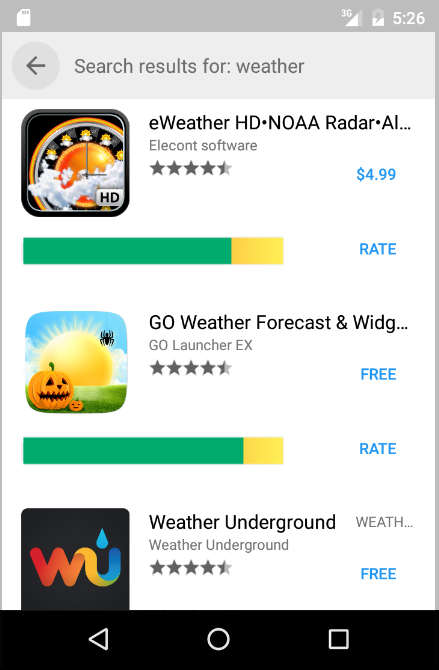
We’ve built a marketplace, the PerMission Store, that tackles both the ranking and user information concerns by adding one key component: permission-specific ratings. These are user ratings, much like the star ratings in the Google Play store, but they are specifically about an app’s permissions.1
To help users find more privacy friendly apps, the privacy ratings are incorporated into the PerMission Store’s ranking mechanism, so that apps with better privacy scores are more likely to appear in the top hits for a given search. (We also consider factors like the star rating in our ranking, so users are still getting useful apps.) So users are selecting from a more privacy-friendly pool of apps right off the bat.
Apps’ privacy ratings are also displayed in an easy-to-understand way, alongside other basic information like star rating and developer. This makes it straightforward for users to consider privacy along with other key factors when deciding which app to install.
Incorporating privacy into the store itself makes it so that choosing privacy-friendly apps is as a natural as choosing useful apps.
The PerMission Store is currently available as an Android app and can be found on Google Play.
A more detailed discussion of the PerMission Store can be found in Section 3.1 of our paper.
This is Part 2 of our series on helping users manage app permissions. Click here to read Part 1.
1: As a bootstrapping mechanism, we’ve collected rating for a couple thousand apps from Mechanical Turk. Ultimately, though, we expect the ratings to come from in-the-wild users.