The Brown PLT Blog

Articles by tag: Pyret
A Benchmark for Tabular Types
Picking Colors for Pyret Error Messages
Scope Inference, a.k.a. Resugaring Scope Rules
The Pyret Programming Language: Why Pyret?
Parley: User Studies for Syntax Design
What Happens When Students Switch (Functional) Languages
Tags: Education, Pyret, Python, User Studies
Posted on 16 July 2023.What happens when students learn a second programming language after having gotten comfortable with one? This was a question of some interest in the 1980s and 1990s, but interest in it diminished. Recent work by Ethel Tshukudu and her collaborators have revived interest in this question.
Unfortunately, none of this work has really considered the role of functional programming. This is especially worth considering in the framework that Tshukudu’s work lays out, which is to separate syntax and semantics. That is the issue we tackle.
Specifically, we try to study two conditions:
-
different syntax, similar semantics
-
similar syntax, different semantics
For the same semantics, any two sufficiently syntactically different functional languages would do. The parenthetical syntax of the Lisp family gives us a syntax that is clearly different from the infix syntaxes of most other languages. In our particular case, we use Racket and Pyret.
The second case is trickier. For a controlled lab study, one could do this with very controlled artificial languages. However, we are interested in student experiences, which require curricula and materials that made-up languages usually cannot provide.
Instead, we find a compromise. The Pyret syntax was inspired by that of Python, though it does have some differences. It comes with all the curricular support we need. Therefore, we can compare it versus an imperative curriculum in Python.
You can read the details in the paper. The work is less interesting for its answers than for its setup. As a community we know very little about this topic. We hope the paper will inspire other educators both through the questions we have asked and the materials we have designed.
A Benchmark for Tabular Types
Tags: Programming Languages, Pyret, Semantics, Tables, Types
Posted on 21 November 2021.Tables are Everywhere
Tables are ubiquitous in the world. Newspapers print tables. Reports include tables. Even children as young as middle-school work comfortably with tables. Tables are, of course, also ubiquitous in programming. Because they provide an easy-to-understand, ubiquitous, already-parsed format, they are also valuable in programming education (e.g., DCIC works extensively with tables before moving on to other compound datatypes).
(Typed) Programming with Tables
When it comes to programming with tables, we have excellent tools like relational databases. However, using external databases creates impedance mismatches, so many programmers like to access tabular data from directly in the language, rather than construct external calls. The popularity of language-embedded query has not diminished with time.
Programming with tables, however, requires attention to types. Tables are inherently heterogeneous: each column is welcome to use whatever type makes most sense. This is all the more so if tables are a part of the language itself: while external data tend to be limited to “wire-format” types like numbers and strings, inside the language they can contain images, functions, other tables, and more. (For instance, we use all of these in Pyret.)
What is the type of a table? To make the output of tabular operations
useful, it can’t be something flat like just Table. Because tables
are heterogenous, they can’t have just a single type parameter (like
Table<T>). It may conceptually make sense to have a type parameter
for each column (e.g., Table<String, Number>), but real-world tables
can have 17 or 37 columns! Programmers also like to access table
columns by name, not only position. And so on.
Making Results Comparable
In Spring 2021, we ran a seminar to understand the state of knowledge of type systems for tables. While we read several excellent papers, we also came away very frustrated: authors simply did not seem to agree on what a “table” was or what operations to support. The result was an enormous degree of incommensurability.
Therefore, rather than invent Yet Another Tabular Type System, we decided to take a step back and address the incommensurability problem. What we need as a community is a shared, baseline understanding of several aspects of tables. That is what this work does: create a tables benchmark. This is not a performance benchmark, however; rather, it’s an expressivity and design benchmark. We call it B2T2: The Brown Benchmark for Tabular Types.
The benchmark doesn’t spring out of thin air. Rather, we extensively studied tabular support in widely-used industrial languages/libraries: R, Python/Pandas, and Julia. To cover educational needs, we also studied the Pyret-based Bootstrap:Data Science curriculum. You will notice that all are based on dynamic languages. (Though Pyret has an optional static type system, it currently does not support tables in any meaningful manner, so tabular programming is essentially dynamic.) This is intentional! If you start with a typed language, you end up reflecting the (potentially artificial and overly-restrictive) constraints of that type system. Rather, it’s healthy to study what programmers (seem to) want to say and do, filter these for reasonability, and reconcile that with the needs of static types (like decidability).
Do Now!
What do you expect to find in a tabular programming benchmark?
Make a list before you read on!
Benchmark Components
B2T2 has the following parts:
-
A definition of a table. There is actually a large space of possibilities here. We’ve chosen a definition that is both broad and interesting without being onerous.
-
Examples of tables. Why did we bother to provide these? We do so because many type systems may have all sorts of internal encodings. They are welcome to do so, but they cannot expect the outside world to conform to their representation. Therefore, these examples represent the canonical versions of these tables. Explaining how these will be converted to the internal format is the responsibility of the type system designers.
-
An API of table operations. This is of course the heart of the benchmark. In particular, different papers seem to use different subsets of operations. What is unclear is whether the missing operations are just as easy as the ones shown; difficult; or even impossible. This is therefore a big source of incommensurability.
-
Example programs. Depending on the representation of tables and the nature of the type systems and languages, these programs may have to be rewritten and may (to some observers) look quite unnatural.
All these might be predictable with some thought. There are two more components that may be a little more surprising:
-
Erroneous programs. In all sophisticated systems, there is a trade-off between complexity and explainability. We are disturbed by how little discussion there is of error-reporting in the papers we’ve read, and think the community should re-balance its emphasis. Even those who only care about technical depth (boo!) can take solace: there can be rich technical work in explaining errors, too! Furthermore, by making errors an explicit component, a team that does research into human factors—even if they leave all other aspects alone—has a “place to stand” to demonstrate their contribution.
-
A datasheet. To improve commensurability, we want authors to tell each other—and their users—in a standard format not only what they did but also where the bodies are buried.
Of course, all these parts are interesting even in the absence of types. We just expect that types will impose the most interesting challenges.
An Open Process
We expect this benchmark to grow and evolve. Therefore, we’ve put our benchmark in a public repository. You’re welcome to make contributions: correct mistakes, refine definitions, add features, provide more interesting examples, etc. You can also contribute solutions in your favorite language!
For More Details
You can read about all this in our paper and work with our repository.
Picking Colors for Pyret Error Messages
Tags: Pyret, Visualization
Posted on 11 June 2018.Pyret has beautiful error messages, like this one:
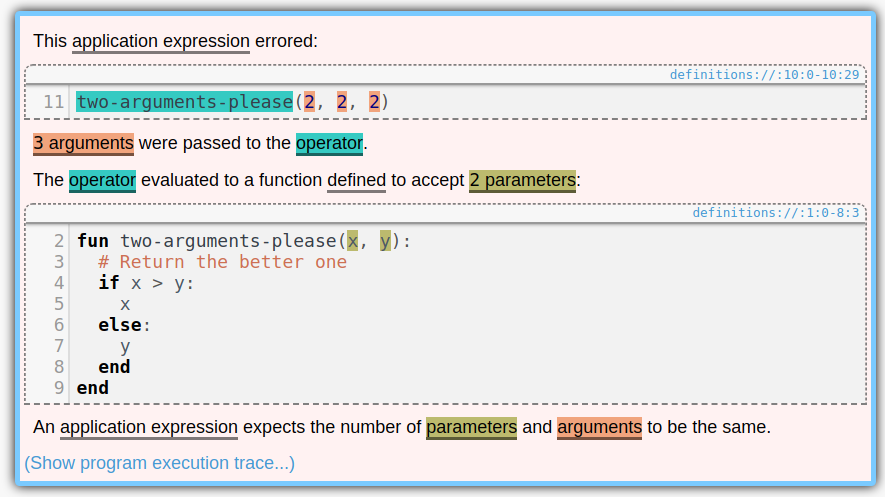
Notice the colors. Aren’t they pretty? Whenever a section of code is mentioned in an error message, it gets highlighted with its own color. And we pick colors that are as different as possible, so they don’t get confused with each other. It is useful to keep all of the colors distinct because it provides a very intuitive one-to-one mapping between parts of the code you wrote and the code snippets mentioned in the error messages. If two error messages used the same color for a snippet, it might look at first glance that they were mentioning the same thing.
(We should say up front: while we believe that the approach described in this post should be fairly robust to most forms of color blindness, it’s difficult to reason about so we make no guarantees. However, if two colors are hard to distinguish by sight, you can always hover over one of them to see the matching section of code blink. EDIT: Actually, it’s not as robust as we had hoped. If you know a good approach to this, let us know.)
How did we make them? It should be easy, right? We could have a list of, say, six colors and use those. After all, no error message needs more than six colors.
Except that there might be multiple error messages. In fact, if you have failing test cases, then you’ll have one failure message per failing test case, each with its own highlight, so there is no upper bound on how many colors we need. (Pyret will only show one of these highlights at a time—whichever one you have selected—but even so it’s nice for them to all have different colors.) Thus we’ll need to be able to generate a set of colors on demand.
Ok, so for any given run of the program, we’ll first determine how many colors we need for that run, and then generate that many colors.
Except that it’s difficult to tell how many colors we need beforehand. In fact, Pyret has a REPL, where users can evaluate expressions, which might throw more errors. Thus it’s impossible to know how many colors we’ll need beforehand, because the user can always produce more errors in the REPL.
Therefore, however we pick colors, it must satisfy these two properties:
- Distinctness: all of the colors in all of the highlights should be as visually different from each other as possible.
- Streaming: we must always be able to pick new colors.
Also, the appearance of the highlights should be pretty uniform; none of them should stand out too much:
- Uniformity: all of the colors should have the same saturation (i.e. colorfulness) and lightness as each other. This way none of them blend in with the background color (which is white) or the text color (which is black), or stand out too much.
The Phillotactic Color-Picking Algorithm
Now let’s talk about the algorithm we use!
(Note that this is “phillotactic”, not “phyllotactic”. It has nothing to do with plants.)
To keep uniformity, it makes sense to pick colors from a rainbow. This is a circle in color space, with constant saturation and lightness and varying hue. Which color space should we use? We should not use RGB, because that space doesn’t agree well with how colors actually appear. For example, if we used a rainbow in RGB space, then green would appear far too bright and blue would appear far too dark. Instead, we should use a color space that agrees with how people actually perceieve colors. The CIELAB color space is better. It was designed so that if you take the distance between two colors in it, that distance approximately agrees with how different the colors seem when you look at them. (It’s only approximate because—among other things—perceptual color space is non-Euclidean.)
Therefore we’ll pick colors from a circle in CIELAB space. This space
has three coordinates: L, for lightness, A for green-red, and B for
blue-yellow (hence the LAB). We determined by experimentation that a
good lightness to use was 73 out of 100. Given this lightness, we
picked the largest saturation possible, using A^2 + B^2 = 40^2.
Now how do we vary the hue? Every color picked needs a new hue, and they need to all be as different as possible. It would be bad, for instance, if we picked 13 colors, and then the 13th color looked just like the 2nd color.
Our solution was to have each color’s hue be the golden angle from the previous hue. From Wikipedia, the golden angle is “the angle subtended by the smaller arc when two arcs that make up a circle are in the golden ratio”. It is also 1/ϕ^2 of a circle, or about 137 degrees.
Thus the phillogenic algorithm keeps track of the number of colors generated so far, and assigns the n’th color a hue of n times the golden angle. So the first color will have a hue of 0 degrees. The second color will have a hue of 137 degrees. The third will have a hue of 137 * 2 = 274 degrees. The fourth will be 137 * 3 = 411 = 51 degrees. This is a little close to the first color. But even if we knew we’d have four colors total, they’d be at most 90 degrees apart, so 51 isn’t too bad. This trend continues: as we pick more and more colors, they never end up much closer to one another than is necessary.
There’s a reason that no two colors end up too similar. It follows from the fact that ϕ is the most difficult number to approximate as a fraction. Here’s a proof that colors aren’t similar:
Suppose that the m’th color and the (m+n)’th color end up being very similar. The difference between the m’th and (m+n)’th colors is the same as the difference between the 0’th and the n’th colors. Thus we are supposing that the 0’th color and the n’th color are very similar.
Let’s measure angles in turns, or fractions of 360 degrees. The n’th
color’s hue is, by definition, n/ϕ^2 % 1 turns. The 0’th hue is 0.
So if these colors are similar, then n/ϕ^2 % 1 ~= 0 (using ~=
for “approximately equals”). We can then reason as follows, using in
the third step the fact that ϕ^2 - ϕ - 1 = 0 so ϕ^2 = ϕ + 1:
n/ϕ^2 % 1 ~= 0
n/ϕ^2 ~= k    for some integer k
ϕ^2 ~= n/k
1 + ϕ ~= n/k
ϕ ~= (n-k)/k
Now, if n is small, then k is small (because n/k ~= ϕ^2), so
(n-k)/k is a fraction with a small denominator. But ϕ is difficult
to approximate with fractions, and the smaller the denominator the
worse the approximation, so ϕ actually isn’t very close to
(n-k)/k, so n/ϕ^2 % 1 actually isn’t very close to 0, so the
n’th color actually isn’t very similar to the 0’th color.
And that’s why the phillotactic colors work.
Scope Inference, a.k.a. Resugaring Scope Rules
Tags: Programming Languages, Pyret, Resugaring, Scope, Semantics
Posted on 12 June 2017.This is the second post in a series about resugaring. It focuses on resugaring scope rules. See also our posts on resugaring evaluation steps and resugaring type rules.
Many programming languages have syntactic sugar. We would hazard to
guess that most modern languages do. This is when a piece of syntax
in a language is defined in terms of the rest of the language. As a
simple example, x += expression might be shorthand for x = x +
expression. A more interesting sugar is
Pyret’s for loops.
For example:
for fold(p from 1, n from range(1, 6)):
  p * n
end
computes 5 factorial, which is 120. This for is a piece of sugar,
though, and the above code is secretly shorthand for:
fold(lam(p, n): p * n end, 1, range(1, 6))
Sugars like this are great for language development: they let you grow a language without making it more complicated.
Languages also have scoping rules that say where variables are in scope. For instance, the scoping rules should say that a function’s parameters are in scope in the body of the function, but not in scope outside of the function. Many nice features in editors depend on these scoping rules. For instance, if you use autocomplete for variable names, it should only suggest variables that are in scope. Similarly, refactoring tools that rename variables need to know what is in scope.
This breaks down in the presence of syntactic sugar, though: how can your editor tell what the scoping rules for a sugar are?
The usual approach is to write down all of the scoping rules for all of the sugars. But this is error prone (you need to make sure that what you write down matches the actual behavior of the sugars), and tedious. It also goes against a general principle we hold: to add a sugar to a language, you should just add the sugar to the language. You shouldn’t also need to update your scoping rules, or update your type system, or update your debugger: that should all be done automatically.
We’ve just published a paper at ICFP that shows how to automatically
infer the scoping rules for a piece of sugar, like the for example
above. Here is the
paper and implementation.
This is the latest work we’ve done with the goal of making the above
principle a reality. Earlier, we showed
how to automatically find evaluation steps that show how your program
runs in the presence of syntatic sugar.
How it Works
Our algorithm needs two things to run:
- The definitions of syntactic sugar. These are given as pattern-based rewrite rules, saying what patterns match and what they should be rewritten to.
- The scoping rules for the base (i.e. core) language.
It then automatically infers scoping rules for the full language, that includes the sugars. The final step to make this useful would be to add these inferred scoping rules to editors that can use them, such as Sublime, Atom, CodeMirror, etc.
For example, we have tested it on Pyret (as well as other languages).
We gave it scoping rules for Pyret’s base language (which included
things like lambdas and function application), and we gave it rules
for how for desugars, and it determined the scoping rules of
for. In particular:
- The variables declared in each
fromclause are visible in the body, but not in the argument of anyfromclause. - If two
fromclauses both declare the same variable, the second one shadows the first one.
This second rule is exactly the sort of thing that is easy to overlook if you try to write these rules down by hand, resulting in obscure bugs (e.g. when doing automatic variable refactoring).
Here are the paper and implementation, if you want to read more or try it out.
The Pyret Programming Language: Why Pyret?
Tags: Education, Programming Languages, Pyret, Semantics, Types
Posted on 26 June 2016.We need better languages for introductory computing. A good introductory language makes good compromises between expressiveness and performance, and between simplicity and feature-richness. Pyret is our evolving experiment in this space.
Since we expect our answer to this question will evolve over time, we’ve picked a place for our case for the language to live, and will update it over time:
The Pyret Code; or A Rationale for The Pyret Programming Language
The first version answers a few questions that we expect many people have when considering languages in general and languages for education in particular:
- Why not just use Java, Python, Racket, OCaml, or Haskell?
- Will Pyret ever be a full-fledged programming language?
- But there are lots of kinds of “education”!
- What are some ways the educational philosophy influences the langauge?
In this post, it’s worth answering one more immediate question:
What’s going on right now, and what’s next?
We are currently hard at work on three very important features:
-
Support for static typing. Pyret will have a conventional type system with tagged unions and a type checker, resulting in straightforward type errors without the complications associated with type inference algorithms. We have carefully designed Pyret to always be typeable, but our earlier type systems were not good enough. We’re pretty happy with how this one is going.
-
Tables are a critical type for storing real-world data. Pyret is adding linguistic and library support for working effectively with tables, which PAPL will use to expose students to “database” thinking from early on.
-
Our model for interactive computation is based on the “world” model. We are currently revising and updating it in a few ways that will help it better serve our new educational programs.
On the educational side, Pyret is already used by the Bootstrap project. We are now developing three new curricula for Bootstrap:
-
A CS1 curriculum, corresponding to a standard introduction to computer science, but with several twists based on our pedagogy and materials.
-
A CS Principles curriculum, for the new US College Board Advanced Placement exam.
-
A physics/modeling curriculum, to help teach students physics and modeling through the medium of programming.
If you’d like to stay abreast of our developments or get involved in our discussions, please come on board!
Parley: User Studies for Syntax Design
Posted on 01 April 2014.
Programming languages' syntax choices have always been cause for spirited, yet unresolvable, debate. Opinions and so-called best practices dominate discussion, with little empirical evidence to justify them. As part of the Pyret project, we've been performing one of the most comprehensive empirical studies on programming language syntax.
To recap some of the issues: Many languages repurpose plain English words
for keywords, and run afoul of the impedance mismatch between, for instance,
the dictionary meaning of switch and its semantics within the
language (see Language-Independent
Conceptual "Bugs" in Novice Programming for a much more detailed
discussion). Another alternative, using non-ASCII symbols which cannot have
their meaning conflated, is promising but doesn't work well with traditional
editors (APL, we're looking at you).
We are, instead, evalauting the use of unconventional syntax motivated by a non-technical, easily-interpreted lexicon. We refer to these cohesive lexicons as lingos, and have begun experimenting with one lingo-based syntax for Pyret, which we call Parley. It is best to see the Parley lingo in action, compared to the more traditional syntax in early versions of Pyret:
var sum = 0
var arr = [1,2,3,4,5,6,7,8]
for each(piece from arr):
  sum := sum + piece
end
yar sum be 0
yar arr be [1,2,3,4,5,6,7,8]
fer each(piece of arr):
  sum now be sum + piece
end
While it should seem obvious to the casual reader that Parley lingo is a strict improvement, this is not a substitute for empirical evaluation. To this end, we have been running a rummy series of user studies to validate the new syntax. Our latest experiments are testing program comprehension using an aye-tracker. The results, which will be submitted to the Principles of Pirate Lingo conference, are pending clearance from our Aye Arr Bee.